
Fractal Curve 3: Iterative Rotation and Scaling Generating Random Fractals
Loading the math board and drawing, please wait…
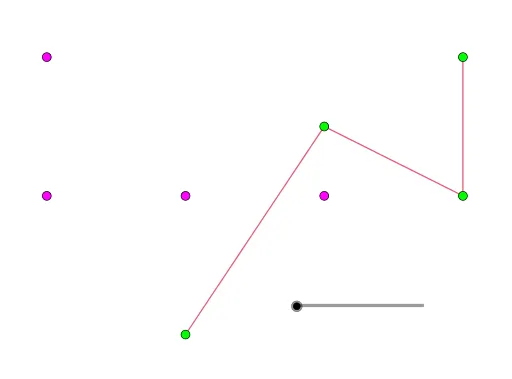
This example demonstrates the generation of a fractal curve through iterative rotation and scaling operations, highlighting the fundamental role of geometric transformations in fractal construction. Core mathematical concepts include fractal geometry, iterative transformations, self-similarity, stochastic processes, and percentage-based scaling. Construction highlights: using GeoGebra's PolyLine command to draw an initial polyline, then applying Dilate (scaling) and Rotate (rotation) commands repeatedly to the polyline, involving base points A, B, C, D, E, F and multiple iterated point sets (such as A', G', H', B' and A1 through E6), with a slider n controlling the iteration depth. Suitable for high school and above to study fractal geometry, geometric transformations, and random experiments, and useful for mathematical visualization teaching or inquiry-based learning.
GeoGebra Commands & Parameters
PolyLine(A, G, H, B) → fDilate(A, 0.5, B) → A'Dilate(G, 0.5, B) → G'Dilate(H, 0.5, B) → H'Dilate(B, 0.5, B) → B'PolyLine(A', G', H', B') → A1Rotate(Translate[PolyLine[Dilate[A, 0.5 / sqrt(2), A], Dilate[G, 0.5 / sqrt(2), A], Dilate[H, 0.5 / sqrt(2), A], Dilate[B, 0.5 / sqrt(2), A]], (0, 1)], (-π) / 4, D) → B1Rotate(PolyLine[Translate[A', (-1, 0)], Translate[G', (-1, 0)], Translate[H', (-1, 0)], Translate[B', (-1, 0)]], π / 2, D) → C1Rotate(Translate[B1, (-1, 1)], (-π) / 2, E) → D1Rotate(PolyLine[Translate[A', (-2, 0)], Translate[G', (-2, 0)], Translate[H', (-2, 0)], Translate[B', (-2, 0)]], (-π) / 2, F) → E1Dilate({A1, B1, C1, D1, E1}, 0.5, B) → A2Rotate(Translate[Dilate[{A1, B1, C1, D1, E1}, 0.5 / sqrt(2), A], (0, 1)], (-π) / 4, D) → B2Rotate(Translate[A2, (-1, 0)], π / 2, D) → C2Rotate(Translate[B2, (-1, 1)], (-π) / 2, E) → D2Rotate(Translate[A2, (-2, 0)], (-π) / 2, F) → E2Dilate({A2, B2, C2, D2, E2}, 0.500000000000002, B) → A3Rotate(Translate[Dilate[{A2, B2, C2, D2, E2}, 0.500000000000002 / sqrt(2), A], (0, 1)], (-π) / 4, D) → B3Rotate(Translate[A3, (-1, 0)], π / 2, D) → C3Rotate(Translate[B3, (-1, 1)], (-π) / 2, E) → D3Rotate(Translate[A3, (-2, 0)], (-π) / 2, F) → E3Dilate({A3, B3, C3, D3, E3}, 0.500000000000004, B) → A4Rotate(Translate[Dilate[{A3, B3, C3, D3, E3}, 0.500000000000004 / sqrt(2), A], (0, 1)], (-π) / 4, D) → B4Rotate(Translate[A4, (-1, 0)], π / 2, D) → C4Rotate(Translate[B4, (-1, 1)], (-π) / 2, E) → D4Rotate(Translate[A4, (-2, 0)], (-π) / 2, F) → E4Dilate({A4, B4, C4, D4, E4}, 0.500000000000006, B) → A5Rotate(Translate[Dilate[{A4, B4, C4, D4, E4}, 0.500000000000006 / sqrt(2), A], (0, 1)], (-π) / 4, D) → B5Rotate(Translate[A5, (-1, 0)], π / 2, D) → C5Rotate(Translate[B5, (-1, 1)], (-π) / 2, E) → D5Rotate(Translate[A5, (-2, 0)], (-π) / 2, F) → E5Dilate({A5, B5, C5, D5, E5}, 0.500000000000008, B) → A6Rotate(Translate[Dilate[{A5, B5, C5, D5, E5}, 0.500000000000008 / sqrt(2), A], (0, 1)], (-π) / 4, D) → B6Rotate(Translate[A6, (-1, 0)], π / 2, D) → C6Rotate(Translate[B6, (-1, 1)], (-π) / 2, E) → D6Rotate(Translate[A6, (-2, 0)], (-π) / 2, F) → E6
AI Drawing Prompt Reference
Draw a fractal curve generated by iterative rotation and scaling. Start with a polyline defined by five base points. Repeatedly apply two transformations: one scales the polyline by 0.5 about a fixed point, the other scales by 0.5 divided by the square root of 2, translates upward by one unit, and rotates counterclockwise by 45 degrees about another point. Each iteration produces five branches combining scaling, rotation, and translation, with sizes decreasing progressively. A slider controls the number of iterations, resulting in a self-similar, random-looking fractal pattern that demonstrates recursive geometric transformations.
The prompt above was compiled from the original drawing commands and is for reference only.