
Four-bar Linkage with Scripts
Loading the math board and drawing, please wait…
In collections
Linkages
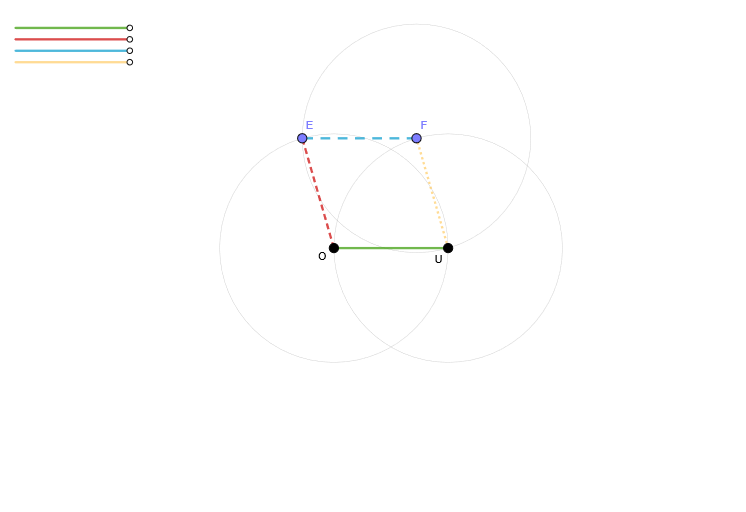
This example demonstrates the motion and geometric relationships of a four-bar linkage. It involves core mathematical concepts such as geometric transformations, coordinate geometry, and locus. Construction highlights include using commands like Segment and Circle to create objects like P3, Q3, r3, P1, Q1, r1, O, U, P2, Q2, r2, c2, F, op6a, b1, P4, Q4, r4, c3, E, b3d, c1, f, e, b2, b4a. Suitable for high school students and educators exploring mechanical design and geometric principles.
GeoGebra Commands & Parameters
Segment(P3, Q3) → r3Segment(P1, Q1) → r1Segment(P2, Q2) → r2Circle(U, 1) → c2Segment(O, U) → b1Segment(P4, Q4) → r4Circle(F, 1) → c3Segment(F, E) → b3dCircle(O, 1) → c1Segment(O, E) → b2Segment(U, F) → b4a
AI Drawing Prompt Reference
Draw a four-bar linkage model to demonstrate its motion and geometric relationships. Include four rods represented as line segments, with key points marked. Center two concentric circles on a fixed point, connecting the center to points on the circles with line segments. Then, draw a circle centered at another point and connect this point to another point with a line segment. Finally, connect points on the two circles to form a closed shape, illustrating geometric principles in mechanical design.
The prompt above was compiled from the original drawing commands and is for reference only.