
Folding a Cube
Loading the math board and drawing, please wait…
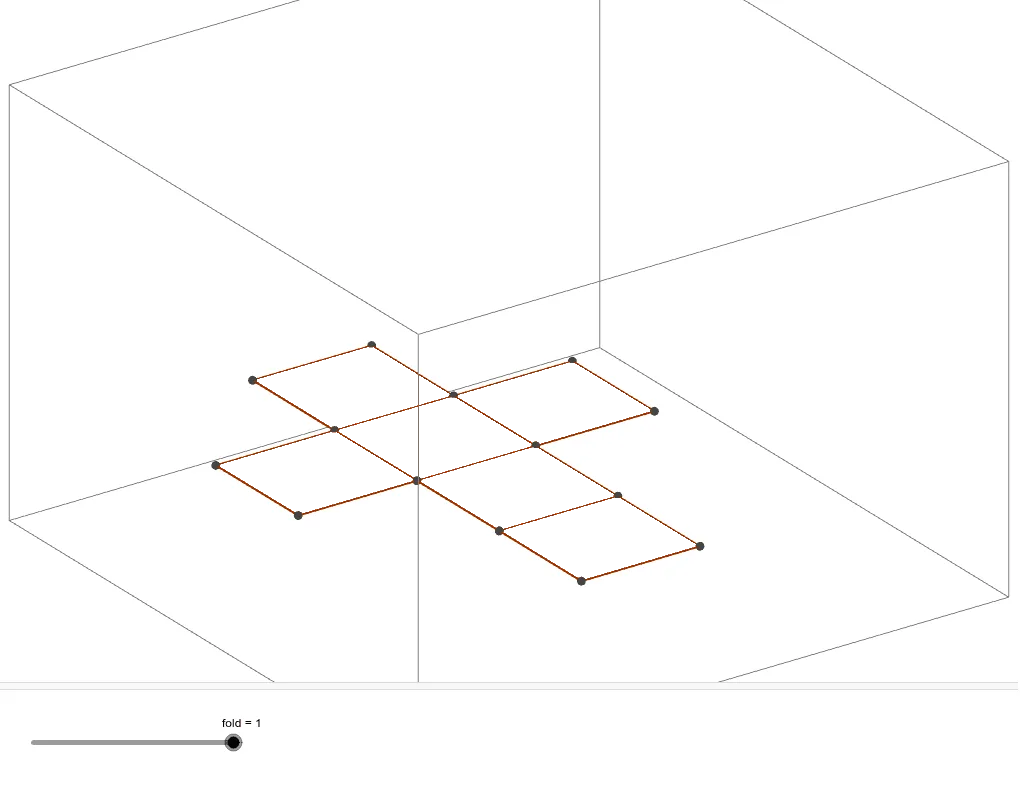
This example demonstrates the process of folding a cube. Key mathematical concepts include solid geometry, specifically the cube and its faces, edges, and vertices. Using GeoGebra commands such as Intersect, Point, and Prism, the net of the cube and the folding process can be constructed. Suitable for middle school and above students to learn solid geometry and geometric construction.
GeoGebra Commands & Parameters
Intersect(zAxis, yAxis) → BPoint(xAxis) → CPoint(yAxis) → EPrism(B, C, D, E, A) → a, F, edgeBC, edgeCD, edgeDE, edgeBE, edgeAB, edgeCF, edgeDG, edgeEH, edgeAF, edgeFG, G, edgeGH, edgeAH, H, faceBCDE, faceABCF, faceCDGF, faceDEHG, faceABEH, faceAFGHNet(a, fold) → c, I, R, S, T, U, V, faceIJKL, faceIJNM, faceJKPO, faceKLRQ, faceILST, J, faceMNUV, edgeIJ, edgeJK, edgeKL, edgeIL, edgeIM, edgeMN, edgeJN, edgeJO, edgeOP, K, edgeKP, edgeKQ, edgeQR, edgeLR, edgeLS, edgeST, edgeIT, edgeNU, edgeUV, edgeMV, L, M, N, O, P, Q
AI Drawing Prompt Reference
Draw a cube and its net, showing the folding process. Start by placing three key points on the coordinate axes: one at the intersection of the z-axis and y-axis, one on the x-axis, and one on the y-axis. Use these points to construct a cube with six faces, twelve edges, and eight vertices. Then unfold the cube into a flat net consisting of six connected squares, with fold lines indicated. The illustration should clearly show the cube's three-dimensional structure and the arrangement of its faces when unfolded.
The prompt above was compiled from the original drawing commands and is for reference only.