
Foci of an Ellipse by Kristen Beck
Loading the math board and drawing, please wait…
In collections
Multivariable Calculus
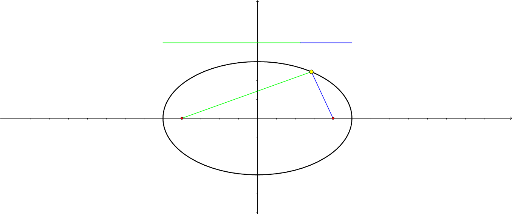
This example demonstrates the foci of an ellipse. Key mathematical concepts include the definition and properties of an ellipse. Construction highlights include using the Point command to create the foci, the Ellipse command to draw the ellipse, and the Segment and Length commands to measure line segments.
GeoGebra Commands & Parameters
Point(xAxis) → APoint(xAxis) → BEllipse(A, B, 5) → cPoint(c) → CSegment(C, A) → fSegment(C, B) → gLength(f) → aLength(g) → bSegment(D, F) → hSegment(F, E) → i
AI Drawing Prompt Reference
Draw an ellipse and mark its foci. Start by creating two points A and B on the x-axis as the foci, then draw the ellipse c using these points and a semi-axis length of 5. Next, select a point C on the ellipse and draw line segments f and g connecting C to A and B, respectively, and measure their lengths a and b. Finally, draw line segments h and i connecting points D and F, and F and E on the ellipse.
The prompt above was compiled from the original drawing commands and is for reference only.