
Floating-Point Operations and Coordinate Geometry Demonstration
Loading the math board and drawing, please wait…
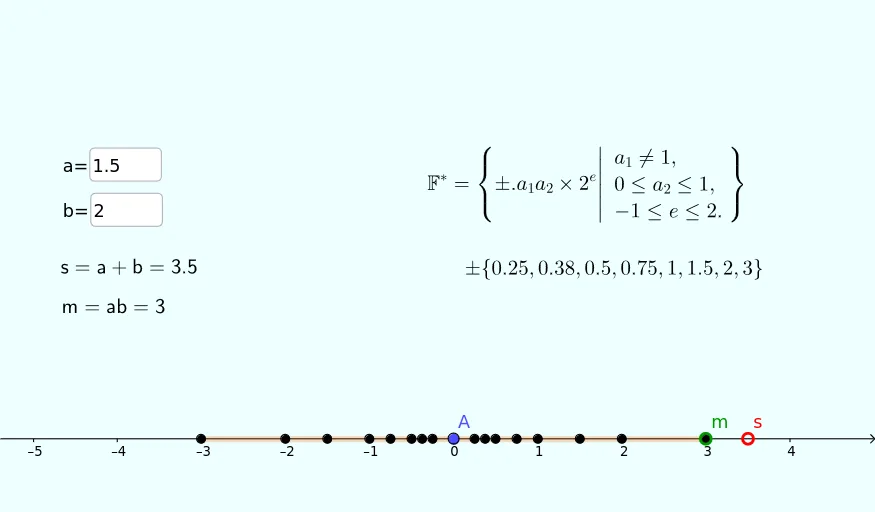
This GeoGebra example demonstrates floating-point arithmetic operations (Ponto Flutuante, Calculo Numerico) and their geometric representation in a coordinate plane. It covers core mathematical concepts such as arithmetic operations, coordinates, intersection, curve sketching basics, and standard deviation within numerical computation. The construction relies on GeoGebra commands Element, Textfield, and Segment, together with point objects A1–A8, B1–B8, C1–C8, list Lista1, text text1, parameters a, b, s, m, c, and segments L2–L8 to create dynamic linkages between numeric input and geometric objects. Suitable for high school and university-level numerical mathematics, calculus preliminaries, and classroom teaching on floating-point calculation and geometric construction.
GeoGebra Commands & Parameters
Element(Lista1, 1) → cTextfield(a) → InputBox1Textfield(b) → InputBox2Segment(C8, B8) → f
AI Drawing Prompt Reference
Demonstrate geometric representation of floating-point operations in a coordinate plane by drawing segments connected to points based on input parameters and labeling key values, showcasing coordinate geometry, graphing, and probability concepts.
The prompt above was compiled from the original drawing commands and is for reference only.