
Flag Perimeter-Area: Dynamic Geometry Exploration
Loading the math board and drawing, please wait…
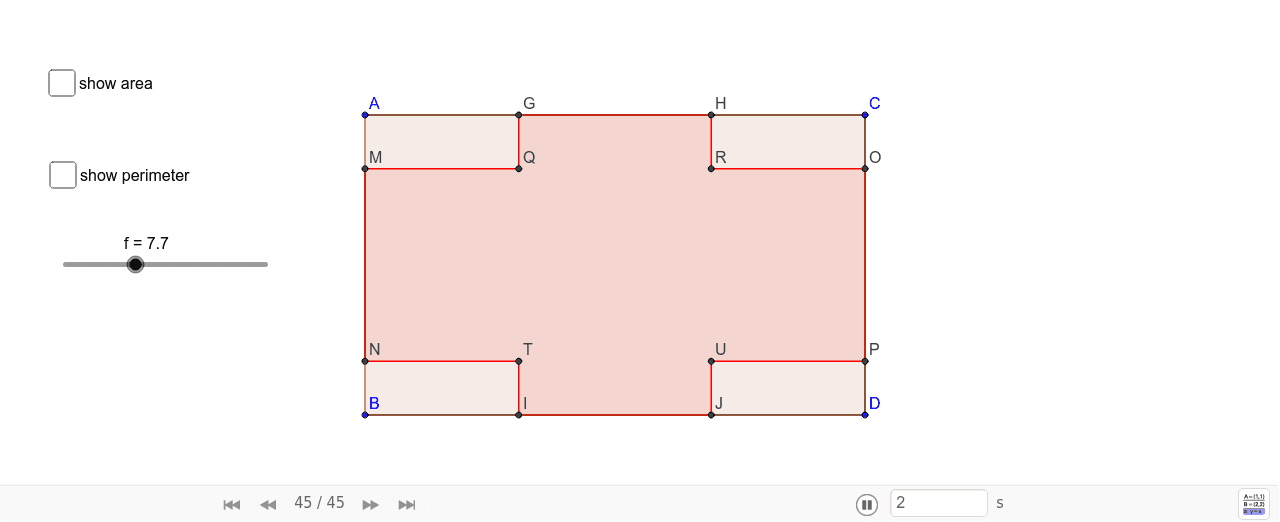
This GeoGebra example dynamically demonstrates the relationship between the perimeter and area of a flag shape. It constructs a flag using segments, circles, and polygons, then computes its perimeter and area in real time. Core mathematical concepts include perimeter, area, rational numbers, circle properties, and combinatorial counting ideas. The construction uses commands such as Segment, LineBisector, Intersect, Circle, Polygon, and PointIn, with objects like points A, B, C, D, segments a, b, c, circles d, e, and polygon poly1. Suitable for middle and high school students to understand geometric measurement and construction, and for teachers to illustrate how perimeter and area change with parameters, fostering dynamic geometric thinking.
GeoGebra Commands & Parameters
Segment(A, B) → aSegment(A, C) → bSegment(B, D) → cSegment(C, D) → dLineBisector(A, C) → eIntersect(e, b) → EIntersect(c, e) → FCircle(E, f / 4) → gIntersect(g, b) → G, HCircle(F, f / 4) → hIntersect(h, c) → I, JSegment(G, I) → iSegment(H, J) → jLineBisector(C, D) → kIntersect(d, k) → KIntersect(a, k) → LSegment(G, I) → lCircle(L, f / 4) → pCircle(K, f / 4) → qIntersect(p, a) → M, NIntersect(q, d) → O, PSegment(M, O) → mSegment(P, N) → nIntersect(l, m) → QIntersect(j, m) → RIntersect(n, j) → SIntersect(n, l) → TPolygon(G, Q, R, H, M, N, T, I, J, S, P, O) → poly1, g_1, o, r, h_1, q_1, m_1, n_1, t, i_1, j_1, s, p_1PointIn(poly1) → Pointpoly1_1Intersect(j, n) → UPointIn(poly1) → Pointpoly1Polygon(A, B, D, C) → poly2, a_1, b_1, d_1, c_1PointIn(poly2) → Pointpoly2
AI Drawing Prompt Reference
Create a flag-shaped figure composed of a quadrilateral and circular arcs. Start by drawing four line segments to form a quadrilateral. Then construct the perpendicular bisectors of two opposite sides to draw circles; their intersections with the sides produce arc points. Connect these points and intersections to outline a polygon that defines the flag's boundary. Include additional circles centered at other points, intersecting the sides to generate more vertices. Finally, draw the polygon using the collected points and add random interior points within the shape. The result is a dynamic flag illustration showing the relationship between its perimeter and area.
The prompt above was compiled from the original drawing commands and is for reference only.