
Finding the Area of the Overlapped Region
Loading the math board and drawing, please wait…
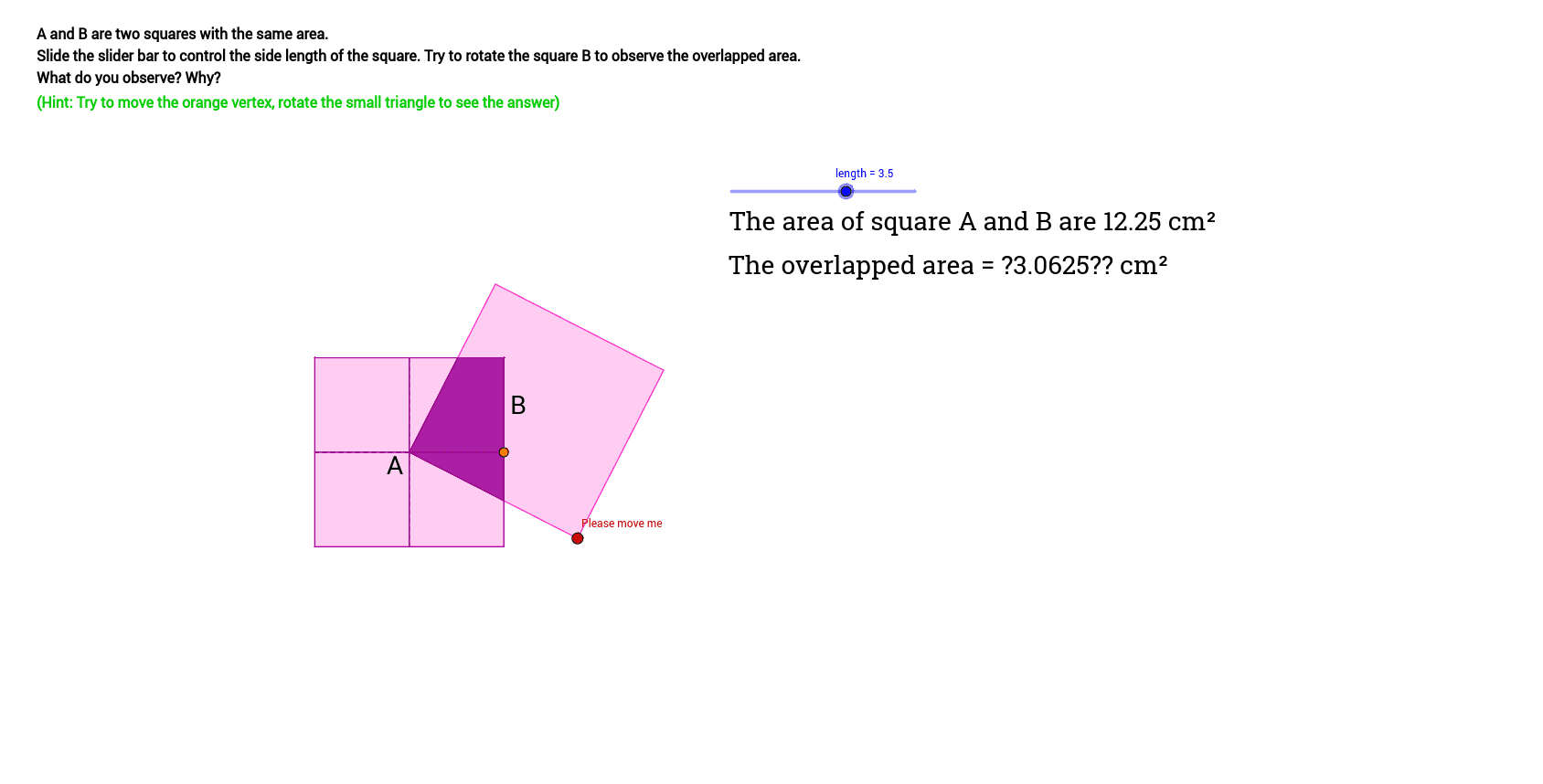
This example demonstrates how to calculate the area of the overlapped region between two squares. Key math concepts include area, rotation, square, perimeter, LCM and GCD. It uses GeoGebra commands like Polygon, Segment, Intersect, Circle, Point, OrthogonalLine, Angle, and PointIn for construction. Suitable for high school mathematics teaching, focusing on geometric calculations and problem-solving skills.
GeoGebra Commands & Parameters
Polygon(B, A, 4) → poly1, b, a_1, c, d, C, DSegment(A, D) → eSegment(B, C) → fIntersect(e, f) → ECircle(E, b) → gPoint(g) → FPolygon(E, F, 4) → poly2, e_1, f_1, h, i, G, HIntersect(b, e_1) → IIntersect(a_1, i) → JPolygon(I, A, J, E) → poly3, i_1, a_2, j, e_2Intersect(b, i) → KIntersect(d, e_1) → LPolygon(L, B, K, E) → poly4, l, b_1, k, e_3Intersect(d, i) → MIntersect(c, e_1) → NPolygon(M, E, N, D) → poly5, m, e_4, n, d_1Intersect(c, i) → OIntersect(a_1, e_1) → PPolygon(E, O, C, P) → poly6, e_5, o, c_1, pOrthogonalLine(E, b) → aPoint(a) → QSegment(Q, E) → qAngle(H, E, Q) → αOrthogonalLine(E, a_1) → rIntersect(r, d) → RSegment(E, R) → sSegment(R, L) → tSegment(E, L) → g_1Circle(E, s) → h_1Point(h_1) → SCircle(S, t) → k_1Circle(E, g_1) → p_1Intersect(k_1, p_1, 1) → TPolygon(S, T, E) → poly7, e_6, s_1, t_1Circle(E, s) → q_1Segment(M, R) → j_1Segment(M, E) → l_1Point(q_1) → UCircle(E, l_1) → c_2Circle(U, j_1) → d_2Intersect(c_2, d_2, 1) → VPolygon(E, U, V) → poly9, v, e_8, uIntersect(a, c) → WSegment(E, N) → m_1Segment(W, N) → n_1Segment(E, W) → f_2Circle(E, m_1) → g_2Circle(E, f_2) → p_2Point(q_1) → XCircle(X, n_1) → h_2Circle(E, m_1) → q_2Intersect(h_2, q_2, 1) → YPolygon(E, X, Y) → poly10, Z, e_9, A_1Intersect(r, a_1) → B_1Segment(E, B_1) → i_2Segment(B_1, P) → j_2Segment(P, E) → l_2Circle(E, l_2) → r_2Circle(E, i_2) → s_2Point(s_2) → C_1Circle(C_1, j_2) → t_2Intersect(r_2, t_2, 1) → D_1Polygon(E, C_1, D_1) → poly11, d_3, e_{10}, c_3Circle(E, i_2) → f_3Point(f_3) → E_1Segment(P, B_1) → m_2Circle(E_1, j_2) → g_3Circle(E, l_2) → h_3Intersect(g_3, h_3, 1) → F_1Polygon(E, F_1, E_1) → poly12, e_{11}, e_{12}, f_4Circle(E, i_2) → k_3Segment(E, J) → n_2Segment(B_1, J) → a_3Circle(E, n_2) → p_3Point(k_3) → G_1Circle(G_1, a_3) → q_3Intersect(p_3, q_3, 1) → H_1Polygon(E, G_1, H_1) → poly13, h_4, e_{13}, g_4Intersect(a, b) → I_1Segment(I_1, E) → b_3Segment(I_1, I) → i_3Segment(I, E) → j_3Circle(E, b_3) → r_3Point(r_3) → J_1Circle(E, j_3) → s_3Circle(J_1, i_3) → t_3Intersect(s_3, t_3, 2) → K_1Polygon(J_1, K_1, E) → poly14, e_{14}, j_4, k_4Segment(K, I_1) → l_3Segment(E, I_1) → m_3Segment(E, K) → n_3Circle(E, m_3) → c_4Circle(E, n_3) → d_4Point(c_4) → L_1Circle(L_1, l_3) → p_4Intersect(d_4, p_4, 1) → M_1Polygon(L_1, E, M_1) → poly15, m_4, l_4, e_{15}Segment(R, E) → a_4Polygon(B, L, E, I_1) → poly8, r_1, b_2, k_2, b_4Polygon(K, B, R, E) → poly16, k_5, b_5, r_4, e_7Polygon(N, D, R, E) → poly17, n_4, d_5, r_5, e_{16}Polygon(W, D, M, E) → poly18, w, d_6, m_5, e_{17}Polygon(W, C, P, E) → poly19, w_1, c_5, p_5, e_{18}Polygon(O, C, B_1, E) → poly20, o_1, c_6, b_6, e_{19}Polygon(I, A, B_1, E) → poly21, i_4, a_5, b_7, e_{20}Polygon(J, A, I_1, E) → poly22, j_5, a_6, i_5, e_{21}PointIn(poly2) → N_1
AI Drawing Prompt Reference
Draw two overlapping squares with one rotated relative to the other, and calculate the area of the overlapped region. Start by constructing the squares and their vertices, then find midpoints of the sides and connect them to form a new square. Use circles and intersection points to define the overlapped area, and subdivide it into smaller polygons. Finally, calculate the area of each polygon and sum them to find the total area of the overlap.
The prompt above was compiled from the original drawing commands and is for reference only.