
Finding Roots of Quadratic with Compass and Ruler by Zbigniew Radziszewski
Loading the math board and drawing, please wait…
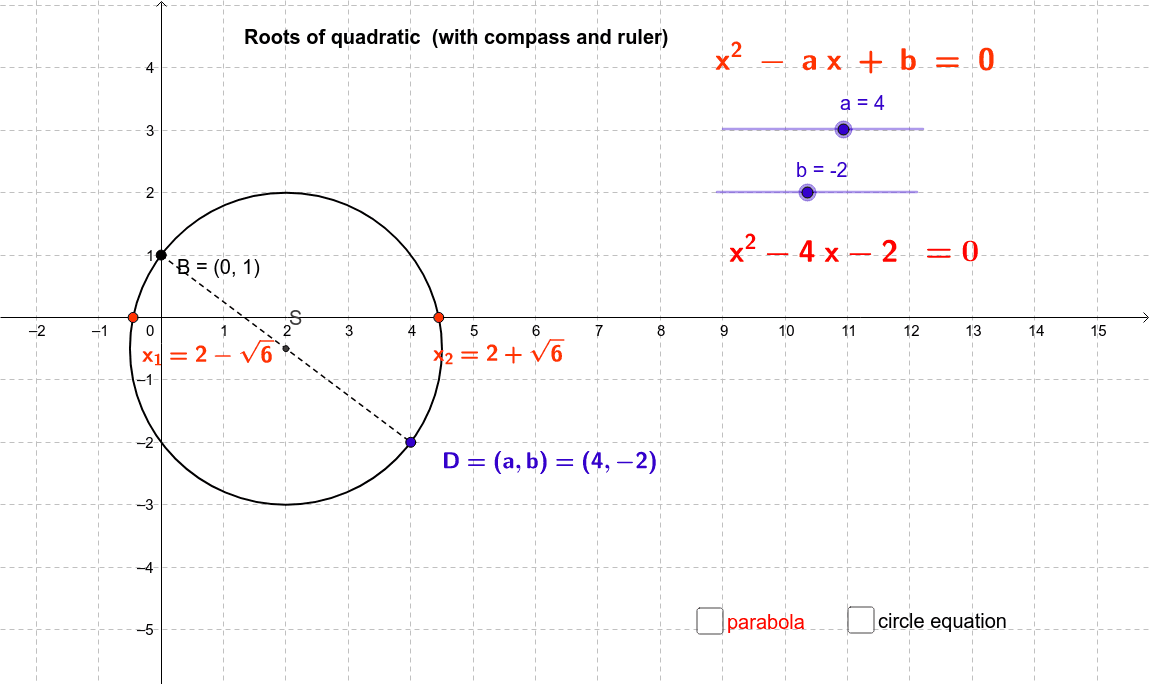
This example demonstrates how to geometrically construct the roots of a quadratic equation using compass and ruler. Key math concepts include quadratic equations, geometric constructions, and coordinate geometry. The construction utilizes GeoGebra commands/objects like Segment, Midpoint, Circle, Intersect, SurdText, and LaTeX as outlined in the construction summary. Suitable for high school mathematics education or learners interested in geometric constructions.
GeoGebra Commands & Parameters
Segment(B, D) → cMidpoint(B, D) → SCircle(S, D) → dIntersect(d, xAxis) → C, ESurdText(x(C)) → xx1SurdText(x(E)) → xx2LaTeX(h, true, false) → tekst1_1
AI Drawing Prompt Reference
Draw a geometric solution of a quadratic equation using a circle and a line. First, draw a line segment, find its midpoint, and draw a circle with the midpoint as the center and the line segment as the radius. Then, let the circle intersect the x-axis at points C and E. Finally, label the x-axis coordinates of C and E as xx1 and xx2 respectively.
The prompt above was compiled from the original drawing commands and is for reference only.