
Finding Approximate Roots of a Bivariate Function
Loading the math board and drawing, please wait…
In collections
intersection: surface-surface, curve-curve
intersection: surface-surface, curve-curve
intersection: surface-surface, curve-curve
intersection: surface-surface, curve-curve
surface 3D
surface 3D
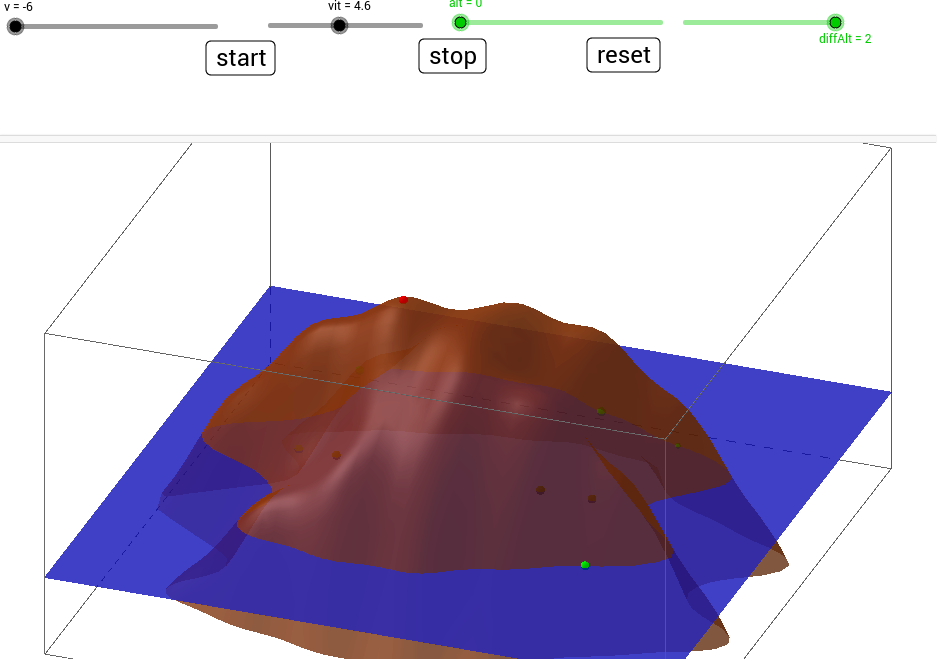
This example demonstrates how to use GeoGebra to find the roots of a bivariate function, involving core concepts like functions, roots, approximation methods, and coordinate geometry. It utilizes commands and objects such as Max, Roots, Plane. Suitable for high school and above learners to understand root-finding techniques.
GeoGebra Commands & Parameters
Max(fx_0, 0, 5) → Maxf0Roots(fx, -10, 10) → Ry_1, Ry_2, ,Roots(fy, -10, 0) → Rx_1, ,Roots(fy, 0, 10) → Rx_2, ,Plane(xAxis, yAxis) → sea
AI Drawing Prompt Reference
Draw a coordinate system with the graph of a bivariate function, marking the roots of the function within specified intervals on both the x-axis and y-axis. Also, indicate the maximum value of the function on the positive x-axis. Finally, add a plane containing the x-axis and y-axis to show the relationship between the function and its roots in 3D space.
The prompt above was compiled from the original drawing commands and is for reference only.