
Filling a Square with Islamic Geometric Patterns
Loading the math board and drawing, please wait…
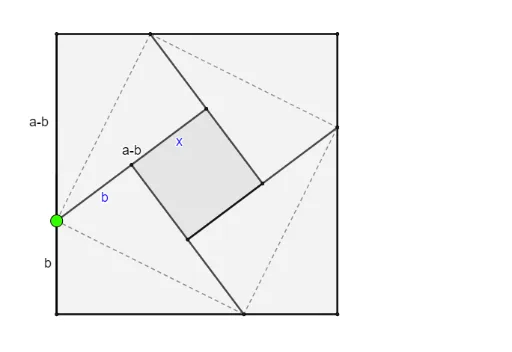
This example demonstrates how to generate a symmetric Islamic-style geometric pattern inside a square using geometric transformations such as rotation and reflection. The core mathematical concepts involve symmetry, rotational transformations, mirror reflections, and the construction of polygons and segments. The construction uses GeoGebra commands including Intersect to determine key intersection points, Polygon and Point to build base shapes (e.g., veelhoek1, vierhoek1), Segment to connect points into lines, and Rotate and Mirror to replicate and reflect parts of the design, resulting in a complex yet orderly decorative pattern. This is suitable for upper secondary or early university students to explore the application of geometric transformations in pattern design, and can serve as a cross-disciplinary resource linking mathematics and art, fostering interest in symmetry and geometric aesthetics.
GeoGebra Commands & Parameters
Intersect(xAxis, yAxis) → APolygon(A, B, 4) → veelhoek1, f, g, h, i, C, DPoint(i) → ESegment(A, E) → jPoint(j) → FRotate(F, 90°, G) → F'Rotate(F, (-(90°)), G) → F'_1Mirror(F, G) → F'_2Segment(F, F'_1) → kMirror(D, k) → D'Rotate(D', 90°, G) → D''Rotate(D', (-(90°)), G) → D''_1Mirror(D', G) → D''_2Segment(F, D') → lSegment(F'_1, D''_1) → mSegment(F'_2, D''_2) → nSegment(F', D'') → pSegment(F'_1, F'_2) → qSegment(F'_2, F') → rSegment(F', F) → sPolygon(D'', D''_2, D''_1, D') → vierhoek1, d'', d''_2, d''_1, d'Segment(F, A) → tSegment(F, D) → aSegment(D''_2, D''_1) → bSegment(F, D'') → cSegment(D'', D') → d