
Exponents Game - Level 5
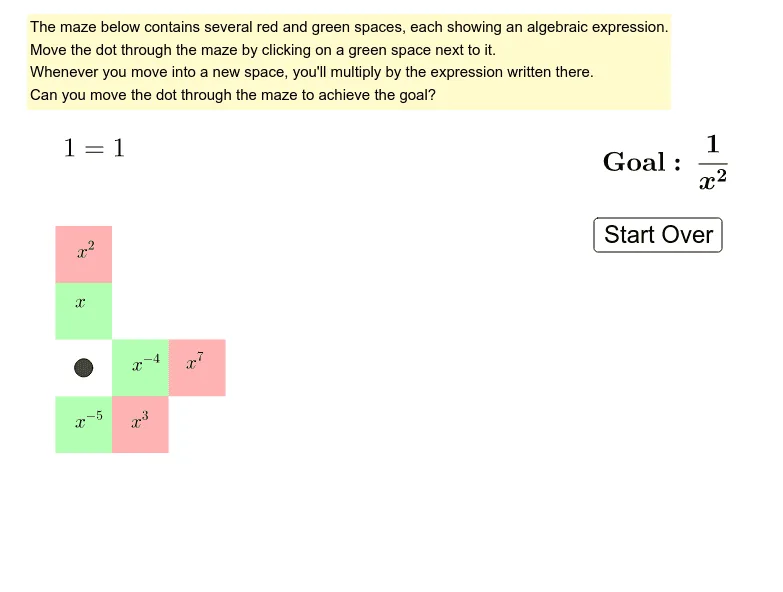
Loading the math board and drawing, please wait…
This example demonstrates exponent rules through a puzzle game. It involves core math concepts like exponent operations, cubes, circumcircle, subtraction, rectangles, and similar triangles. Constructed using GeoGebra commands such as Intersect, Polygon, and Point with objects A, B, C, D, etc. Suitable for middle school and above to practice exponent rules and enhance mathematical application skills.
GeoGebra Commands & Parameters
Intersect(xAxis, yAxis) → APolygon(A, B, C, D) → polyA6, a, b, c, dPoint(yAxis) → FPolygon(D, C, E, F) → polyA5, d_1, c_1, e, fPoint(yAxis) → HPolygon(F, E, G, H) → polyA4, f_1, e_1, g, hPoint(yAxis) → JPolygon(J, I, K, L) → polyA2, j_1, i_1, k, lPolygon(L, K, M, N) → polyA1, l_1, k_1, m, nPolygon(B, O, P, C) → polyB6, b_1, o, p, c_2Polygon(C, P, Q, E) → polyB5, c_3, p_1, q, e_2Polygon(E, Q, R, G) → polyB4, e_3, q_1, r, g_2Polygon(G, R, S, I) → polyB3, g_3, r_1, s, i_2Polygon(I, S, T, K) → polyB2, i_3, s_1, t, k_2Polygon(K, T, U, M) → polyB1, k_3, t_1, u, m_1Point(xAxis) → VPolygon(O, V, W, P) → polyC6, o_1, v, w, p_2Polygon(P, W, Z, Q) → polyC5, p_3, w_1, z_1, q_2Polygon(Q, Z, A_1, R) → polyC4, q_3, z_2, a_1, r_2Polygon(R, A_1, B_1, S) → polyC3, r_3, a_2, b_2, s_2Polygon(S, B_1, C_1, T) → polyC2, s_3, b_3, c_4, t_2Polygon(T, C_1, D_1, U) → polyC1, t_3, c_5, d_2, u_1Point(xAxis) → E_1Polygon(V, E_1, F_1, W) → polyD6, v_1, e_4, f_2, w_2Polygon(W, F_1, G_1, Z) → polyD5, w_3, f_3, g_4, z_3Polygon(Z, G_1, H_1, A_1) → polyD4, z_4, g_5, h_2, a_3Polygon(A_1, H_1, I_1, B_1) → polyD3, a_4, h_3, i_4, b_4Polygon(B_1, I_1, J_1, C_1) → polyD2, b_5, i_5, j_2, c_6Polygon(C_1, J_1, K_1, D_1) → polyD1, c_7, j_3, k_4, d_3Point(xAxis) → L_1Polygon(E_1, L_1, M_1, F_1) → polyE6, e_5, l_2, m_2, f_4Polygon(F_1, M_1, N_1, G_1) → polyE5, f_5, m_3, n_1, g_6Polygon(G_1, N_1, O_1, H_1) → polyE4, g_7, n_2, o_2, h_4Polygon(H_1, O_1, P_1, I_1) → polyE3, h_5, o_3, p_4, i_6Polygon(I_1, P_1, Q_1, J_1) → polyE2, i_7, p_5, q_4, j_4Polygon(J_1, Q_1, R_1, K_1) → polyE1, j_5, q_5, r_4, k_5Point(xAxis) → S_1Polygon(L_1, S_1, T_1, M_1) → polyF6, l_3, s_4, t_4, m_4Polygon(M_1, T_1, U_1, N_1) → polyF5, m_5, t_5, u_2, n_3Polygon(N_1, U_1, V_1, O_1) → polyF4, n_4, u_3, v_2, o_4Polygon(O_1, V_1, W_1, P_1) → polyF3, o_5, v_3, w_4, p_6Polygon(P_1, W_1, Z_1, Q_1) → polyF2, p_7, w_5, z_5, q_6Polygon(Q_1, Z_1, A_2, R_1) → polyF1, q_7, z_6, a_5, r_5
AI Drawing Prompt Reference
Draw a complex geometric figure composed of multiple polygons and circles. The center of the figure is the intersection of the coordinate axes, with multiple nested polygons extending outward, each formed by connecting four points. These polygons connect through shared edges and vertices, creating a puzzle-like structure. The entire figure exhibits symmetry and a hierarchical arrangement, suitable for demonstrating geometric construction and similar triangles.
The prompt above was compiled from the original drawing commands and is for reference only.