
Exponent Rules Interactive Practice: Demonstrating Power Laws with Buttons and T
Loading the math board and drawing, please wait…
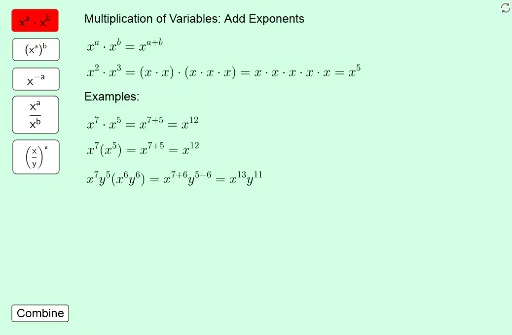
① This example is an interactive math practice tool that dynamically demonstrates fundamental exponent rules, such as the product rule, quotient rule, and power of a power rule, through multiple buttons and text objects. ② Core mathematical concepts include exponent laws (multiplying like bases, dividing like bases, raising a power to a power), negative exponents, zero exponents, and combining/simplifying exponential expressions. ③ Construction highlights: The GeoGebra commands used include Text for creating labels, GCD for computing greatest common divisors to aid simplification, and multiple buttons (button1 to button6) along with rule objects (rule1 to rule5, aRule1, bRule1, etc.) to trigger different rule demonstrations, with text objects (text1 to text19) displaying rule content and examples. ④ Suitable for middle school to high school students learning exponent operations, and also useful as an interactive classroom demonstration or self-study resource.
GeoGebra Commands & Parameters
Text("") → text51GCD(combine_{14a}, combine_{14d}) → combine_{14gcd1}GCD(combine_{14f}, combine_{14h}) → combine_{14gcd2}GCD((combine_{14a} * combine_{14f}), (combine_{14d} * combine_{14h})) → combine_{14gcd3}
AI Drawing Prompt Reference
Create an interactive practice interface for exponent rules, featuring multiple buttons and text areas. The center displays examples of exponent operations, such as multiplying like bases, dividing like bases, and raising a power to a power, with simplification steps. Text objects show explanations and numeric examples for each rule, like adding or subtracting exponents when bases are equal. Buttons trigger different rule demonstrations, each linked to a rule text showing the calculation process. The interface also includes auxiliary texts for computing greatest common divisors to aid simplification. The layout is clean, suitable for classroom teaching, with readable fonts and a simple background.
The prompt above was compiled from the original drawing commands and is for reference only.