
Exponent Operations and Geometric Construction: Exploring Power Rules and Visual
Loading the math board and drawing, please wait…
In collections
Rechnen mit Potenzen
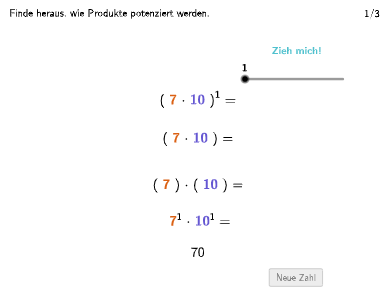
This example demonstrates how to solve mathematical problems using exponent rules and visualize results through geometric figures. Key mathematical concepts include power rules, exponent simplification, and geometric construction techniques. Construction involves using GeoGebra commands like Textfield, Shuffle, Segment, and input boxes to create dynamic visualizations. Suitable for middle school students to understand applications of exponent operations in geometry contexts, suitable for classroom instruction and self-study.
GeoGebra Commands & Parameters
Textfield(input1) → InputBox1Textfield(input2) → InputBox2Textfield(input3) → InputBox3Textfield(input4) → InputBox4Shuffle({1, 2, 3, 4, 5, 6, 7, 8, 9, 10} \ {oldnum, oldnum2}) → RandomList, {1, 7, 10, 4, 8, 3, 9, 2}Text(Text12, F, false, true, 0, 0) → Text13Text(Text2, B, false, true, 0, 0) → Text5Text(Text3, A, false, true, 0, 0) → Text4Segment(G, G + (0, (-lengthArrow))) → fSelectedIndex(DD1) → index1Polygon({H, (x(H), y(I)), I, (x(I), y(H))}) → v1Text(ResultTxtHelper, E, false, true, 0, 0) → Text8
AI Drawing Prompt Reference
Create an interactive geometry and exponent learning canvas featuring four input text fields for exponent operation practice. Display a randomly shuffled number sequence on the screen. A dropdown menu allows selecting different polygon types, with the system dynamically generating corresponding geometric figures based on the selection, including quadrilaterals constructed from two control points using coordinate transformations. Letter labels such as A, B, and F are positioned appropriately at various locations, with a downward arrow pointing from a certain point. The entire interface supports user input, option selection, and immediate visualization of exponent calculation results alongside geometric constructions, suitable for mathematics learning and exploration.
The prompt above was compiled from the original drawing commands and is for reference only.