
Exploring Volume and Surface Area of Triangular Prism
Loading the math board and drawing, please wait…
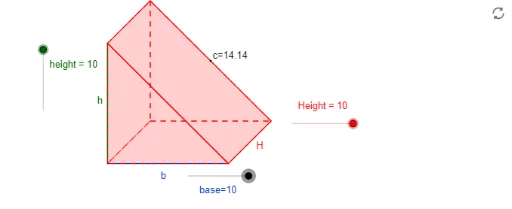
① This example dynamically demonstrates a right triangular prism, allowing learners to explore how its volume and surface area are calculated and how they change with dimensions. ② Core math concepts include the volume formula (base area × height), surface area (two triangular bases plus three rectangular lateral faces), and the relationship between linear dimensions and these measures. ③ Construction uses GeoGebra commands such as Dilate, Vector, Translate, Polygon, Midpoint, and If to build the prism's base, height, and translated copies; sliders (e.g., height, base) control the size, and objects like vertices, edges, and midpoints are used to visualize the structure. ④ Suitable for middle or high school geometry and solid geometry lessons, ideal for interactive exploration of formulas, teacher demonstrations, or student self-study.
GeoGebra Commands & Parameters
Dilate(F, height, E) → GVector(E, G) → uDilate(I, base, H_1) → LVector(H_1, L) → vCircle(J, Height) → gLine(J, K) → h_1Intersect(g, h_1, 1) → MVector(J, M) → wTranslate(A, v) → BTranslate(A, u) → CPolygon(C, A, B) → P, h, c, aTranslate(C, Vector[w / 2]) → C'Translate(A, Vector[w / 2]) → A'Translate(B, Vector[w / 2]) → B'Polygon(C', A', B') → P', b', c', a'Polygon(C, C', A', A) → Q, c_1, c'_1, a'_1, a_1Polygon(C, B, B', C') → R, c_2, H, b'_1, c'_2Polygon(A, A', B', B) → S, a_2, a'_2, b'_2, b_2Midpoint(C, A) → DMidpoint(A, B) → NMidpoint(B, B') → OMidpoint(B, B') → VIf(VolumeFormula ≟ 1, W) → B_1If(VolumeSolution ≟ 1, Y) → C_1If(SurfaceAreaFormula ≟ 1, Z) → D_1If(SurfaceAreaSolution ≟ 1, A_1) → E_1Midpoint(B', C') → F_1
AI Drawing Prompt Reference
Draw a right triangular prism with adjustable dimensions, where the base is a triangle and the height is controlled by a slider. Start with the base triangle, then translate it vertically to create the top triangle, and connect corresponding vertices to form three rectangular lateral faces. Mark the midpoints of the base triangle's edges, and display the volume and surface area formulas along with their computed values, which can be toggled on or off. The overall figure should clearly show the 3D structure, making it easy to observe how changes in dimensions affect volume and surface area.
The prompt above was compiled from the original drawing commands and is for reference only.