
Exploring Trigonometric Ratios by S Sharma
Loading the math board and drawing, please wait…
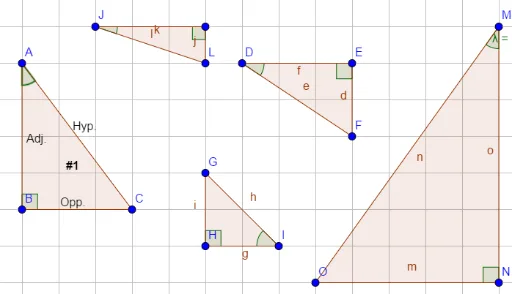
This example uses triangle construction to explore trigonometric ratios. It demonstrates basic trigonometric functions such as sine, cosine, and tangent. Using GeoGebra commands like Polygon and Angle, users can dynamically adjust the angles and sides of the triangle to observe changes in the trigonometric ratios. Suitable for middle school and above students to learn basic concepts of trigonometric functions.
GeoGebra Commands & Parameters
Polygon(A, B, C) → poly1, c, a, bPolygon(D, E, F) → poly2, f, d, ePolygon(G, H, I) → poly3, i, g, hPolygon(J, K, L) → poly4, l, j, kAngle(C, B, A) → αAngle(I, H, G) → βAngle(D, E, F) → γAngle(J, K, L) → δPolygon(M, N, O) → poly5, o, m, nAngle(M, N, O) → εAngle(B, A, C) → ζAngle(G, I, H) → ηAngle(F, D, E) → θAngle(L, J, K) → ιAngle(L, J, K) → κAngle(O, M, N) → λ
AI Drawing Prompt Reference
Draw a triangle ABC, then draw triangles DEF, GHI, JKL, and MNO. Measure the angles A, B, C in triangle ABC, and angles D, E, F, G, H, I, J, K, L, M, N in triangles DEF, GHI, JKL, and MNO. Adjust the sides and angles of the triangles to observe changes in trigonometric functions (sine, cosine, tangent).
The prompt above was compiled from the original drawing commands and is for reference only.