
Exploring the Exterior Angle of a Triangle
Loading the math board and drawing, please wait…
In collections
Triangle Inequalities
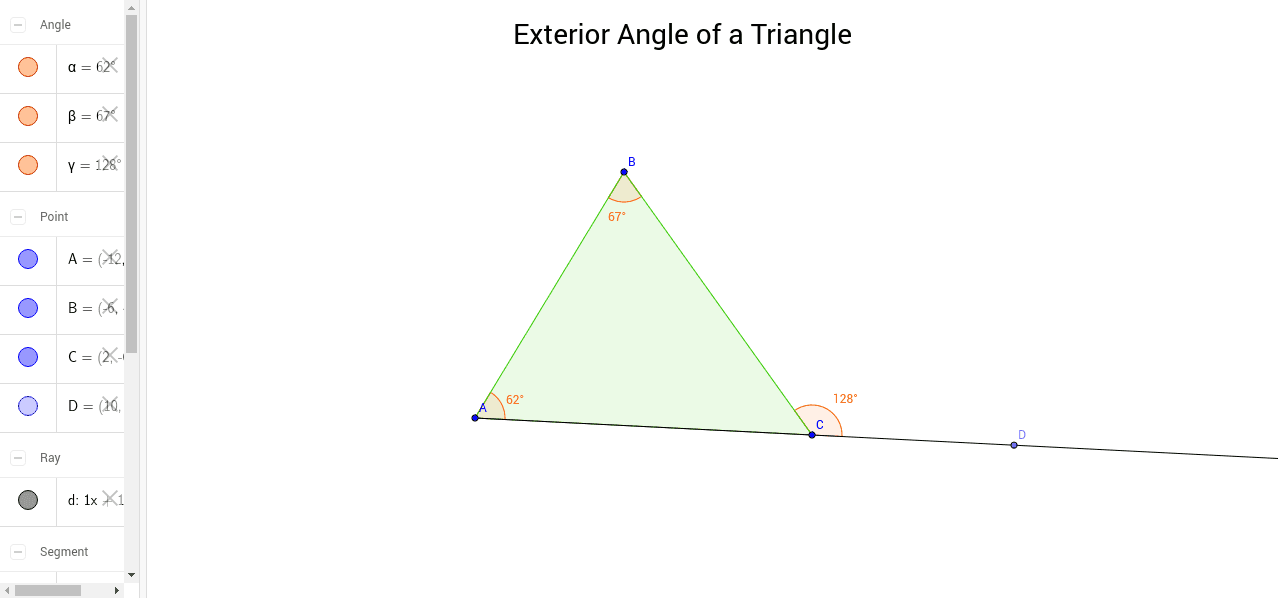
This GeoGebra applet offers an interactive demonstration of the exterior angles of a triangle, enabling users to discover their properties through hands-on manipulation. The key mathematical concept is the exterior angle theorem, which states that each exterior angle equals the sum of the two opposite interior angles, fundamental in geometry. Construction-wise, it uses GeoGebra commands like Polygon to form the triangle, Ray to extend sides for exterior angles, Point to label vertices A, B, C, and exterior point D, and Angle to display measures of α, β, γ. Objects such as text1 for annotations, polygon poly1 for the triangle area, and lines a, b, c, d for edges or extensions facilitate clear visualization. Ideal for middle school or high school geometry education, it serves as a teaching aid or student exploration tool to deepen understanding of angular relationships.
GeoGebra Commands & Parameters
Polygon(A, B, C) → poly1, c, a, bRay(A, C) → dPoint(d) → DAngle(C, A, B) → αAngle(A, B, C) → βAngle(D, C, B) → γ
AI Drawing Prompt Reference
Draw a triangle with vertices labeled A, B, and C. Extend the side AC from A through C to create a ray, and mark a point D on this ray. Display the interior angles: angle α at vertex A, angle β at vertex B, and the exterior angle γ at vertex C, formed between side BC and the extension CD. The illustration should clearly demonstrate the exterior angle theorem, showing that γ equals the sum of α and β. Use straight lines for the triangle edges and the extension, and include textual annotations to highlight the angular relationships for educational purposes.
The prompt above was compiled from the original drawing commands and is for reference only.