
Exploring the Area of a Triangle by Edward Knote
Loading the math board and drawing, please wait…
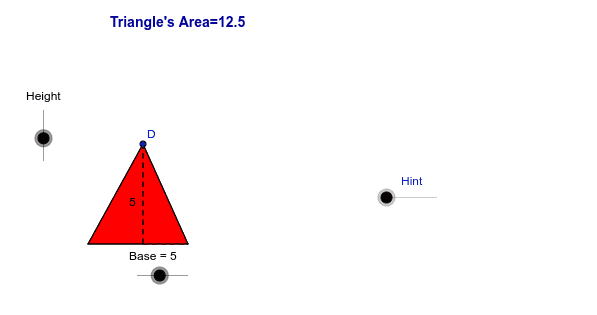
This example dynamically demonstrates the derivation of the triangle area formula. It involves core math concepts like triangle area, base, height, coordinate geometry, and geometric construction. Key GeoGebra commands used include Circle, Point, Segment, Line, OrthogonalLine, Intersect, Tangent, Polygon, Midpoint, If, Rotate, with objects like A, Height, Base, c, d, B, e, f, g, C, h, a, D, P, d_1, a_1, b_1, i, E, j, k, F, G, H, p, I, l, m, J, K, L, n, q, α, A', B', D', P', d', a'. Suitable for middle school students and math enthusiasts learning the triangle area formula and its applications.
GeoGebra Commands & Parameters
Circle(A, Height) → cCircle(A, Base) → dPoint(d) → BSegment(A, B) → eLine(A, B) → fOrthogonalLine(A, f) → gIntersect(c, g, 1) → CTangent(C, c) → h, aPoint(h) → DPolygon(A, B, D) → P, d_1, a_1, b_1OrthogonalLine(D, f) → iIntersect(f, i) → ESegment(E, D) → jSegment(E, B) → kMidpoint(D, B) → FMidpoint(D, A) → GPoint(a_1) → HCircle(B, H) → pIntersect(p, d_1, 1) → IOrthogonalLine(H, a_1) → lOrthogonalLine(I, d_1) → mIntersect(l, m) → JIf(x(D) ≟ x(B), G) → KIf(x(D) ≟ x(B), J) → LSegment(L, H) → nSegment(L, I) → qRotate(A, α, K) → A'Rotate(B, α, K) → B'Rotate(D, α, K) → D'Polygon(A', B', D') → P', d', a', b'If(x(D) ≟ x(A), F) → MPoint(b_1) → NCircle(A, N) → rIntersect(r, d_1, 1) → OOrthogonalLine(N, b_1) → sOrthogonalLine(O, d_1) → tIntersect(s, t) → QIf(x(D) ≟ x(A), Q) → RSegment(N, R) → c_1Segment(R, O) → e_1Rotate(A, -α, M) → A'_1Rotate(B, -α, M) → B'_1Rotate(D, -α, M) → D'_1Polygon(A'_1, B'_1, D'_1) → P'_1, d'_1, a'_1, b'_1If(x(D) > x(B), G) → SRotate(A, α, S) → A'_2Rotate(B, α, S) → B'_2Rotate(D, α, S) → D'_2Polygon(A'_2, B'_2, D'_2) → P'_2, d'_2, a'_2, b'_2If(x(D) < x(A), F) → TRotate(A, -α, T) → A'_3Rotate(B, -α, T) → B'_3Rotate(D, -α, T) → D'_3Polygon(A'_3, B'_3, D'_3) → P'_3, d'_3, a'_3, b'_3If((x(D) > x(A)) ∧ (x(D) < x(B)), F) → URotate(A, -α, U) → A'_4Rotate(B, -α, U) → B'_4Rotate(D, -α, U) → D'_4Polygon(A'_4, B'_4, D'_4) → P'_4, d'_4, a'_4, b'_4Midpoint(D, E) → VMidpoint(A, B) → W
AI Drawing Prompt Reference
Draw a triangle to dynamically demonstrate the derivation of its area formula. Start by drawing the base and height of the triangle, then draw a circle with the height as the radius, intersecting the base at a point. Connect the vertex to this point to form a triangle. Next, draw the median and height of the triangle, and use circles and tangents to construct auxiliary shapes. Finally, show the geometric meaning of the area formula through rotation and reflection operations.
The prompt above was compiled from the original drawing commands and is for reference only.