
Exploring the Area of a Trapezium Formed by Diameters of Two Tangent Circles
Loading the math board and drawing, please wait…
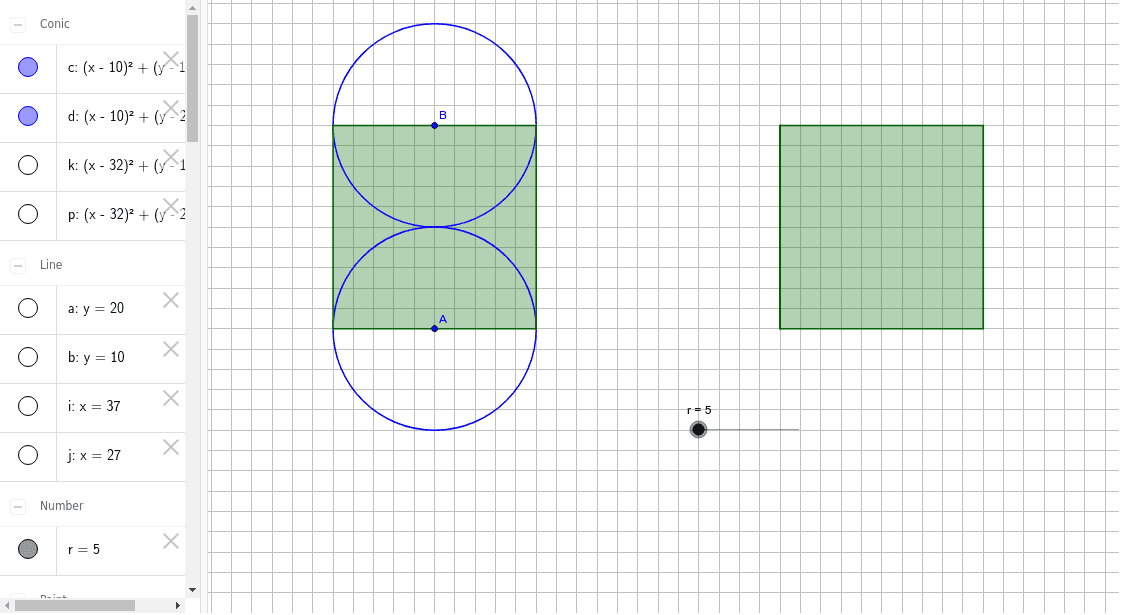
This GeoGebra example demonstrates a trapezium defined by the diameters of two tangent circles whose centers are 10 units apart. As the radii of the circles vary, the shape and area of the trapezium change, allowing students to explore the relationship between the circle geometry and the resulting quadrilateral area. Core mathematical concepts include tangent circles, diameters, trapezium area formula, quadratic functions, and optimization. The construction uses GeoGebra commands such as Circle, Line, Intersect, Polygon, Point, and OrthogonalLine to build the circles, draw diameters, find intersection points, and form the trapezium. A slider controls the variable radius, enabling dynamic exploration. This resource is suitable for high school or early college students studying geometry, algebra, and optimization, and serves as an interactive tool for teachers to illustrate how changing parameters affect area in a dynamic geometric setting.
GeoGebra Commands & Parameters
Circle(A, r) → cCircle(B, 10 - r) → dLine(D, B) → aLine(C, A) → bIntersect(d, a) → E, FIntersect(c, b) → G, HPolygon(G, H, F, E) → poly1, g, h, f, ePoint(b) → IPoint(a) → JCircle(I, r) → kCircle(J, 10 - r) → pIntersect(p, a) → K, LIntersect(k, b) → M, NPolygon(M, N, L, K) → poly2, m, n, l, k_1OrthogonalLine(L, b) → iOrthogonalLine(M, a) → jIntersect(a, j) → OIntersect(b, i) → PPolygon(P, N, L) → poly3, l_1, p_1, n_1Polygon(K, O, M) → poly4, m_1, k_2, oPolygon(M, P, L, K) → poly5, m_2, p_2, l_2, k_3
AI Drawing Prompt Reference
Draw two tangent circles with centers 10 units apart, radii being a variable and 10 minus that variable. From each center, draw a line perpendicular to the line connecting the centers, intersecting both circles to get four points, which form a trapezium. Then pick a point on each perpendicular line, draw two new circles with those points as centers and the same radii, and repeat to get a second trapezium. Finally, from two vertices of the second trapezium, draw perpendiculars to opposite sides, intersecting the sides, creating three triangles and a quadrilateral, all together forming a composite figure.
The prompt above was compiled from the original drawing commands and is for reference only.