
Exploring SSS Condition in Hyperbolic Geometry
Loading the math board and drawing, please wait…
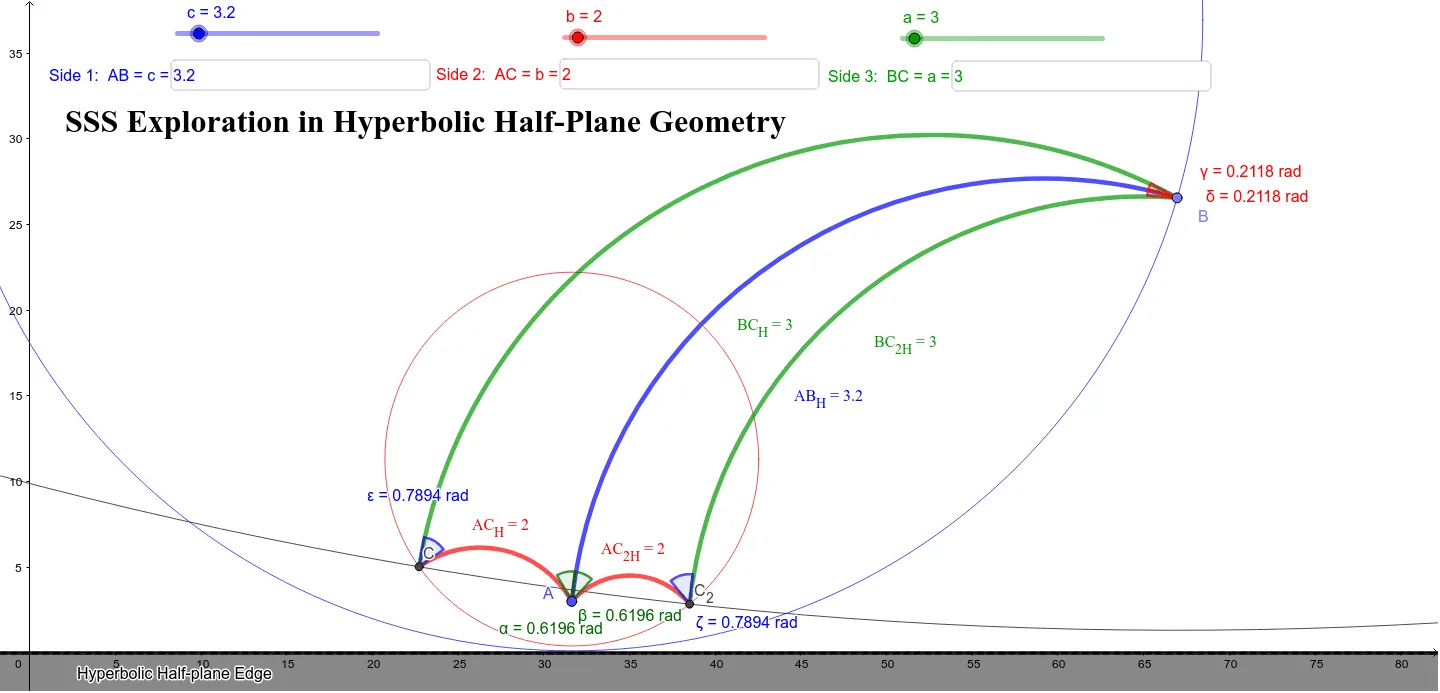
This example explores the SSS condition in hyperbolic geometry, focusing on triangle congruence. Key mathematical concepts include hyperbolic geometry and triangle congruence. Using GeoGebra commands such as HCircleCr, HSegment, and HAngleMeasure, the construction of triangles in the hyperbolic plane is demonstrated, with slider animations adjusting parameters to observe changes. Suitable for high school mathematics education and learning.
GeoGebra Commands & Parameters
Textfield(c) → InputBox1Textfield(b) → InputBox3HCircleCr(A, c) → dPoint(d) → BHRay(A, B) → eHSegment(A, B) → gHCircleCr(A, b) → pHDistance(A, B) → i, text1HCircleCr(B, a) → hIntersect(p, h) → C, C_2, ,HSegment(C, B) → kHSegment(B, C_2) → qHSegment(C_2, A) → rHSegment(A, C) → sHDistance(A, C) → j, text2HDistance(A, C_2) → l, text3HDistance(B, C) → m, text5HDistance(B, C_2) → n, text6HAngleMeasure(B, A, C) → αHAngleMeasure(C_2, A, B) → βHAngleMeasure(A, B, C_2) → γHAngleMeasure(C, B, A) → δHAngleMeasure(A, C, B) → εHAngleMeasure(B, C_2, A) → ζTextfield(a) → InputBox2HAngleMeasure(A, B, C) → η
AI Drawing Prompt Reference
Draw a triangle ABC in the hyperbolic plane with side lengths a, b, and c. First, draw a circle centered at point A with radius c to determine point B. Then, draw a ray from point A to determine point B. Next, draw a circle centered at point A with radius b and another circle centered at point B with radius a; their intersection points are potential points for C. Finally, connect points A, B, and C to form triangle ABC. Adjust the parameters a, b, and c to observe changes in the triangle.
The prompt above was compiled from the original drawing commands and is for reference only.