
Exploring Sequence and nth Term Expressions
Loading the math board and drawing, please wait…
In collections
CBSE Class VI Maths
Expressions and equations
Expressions and equations
Expressions and equations
Expressions and equations
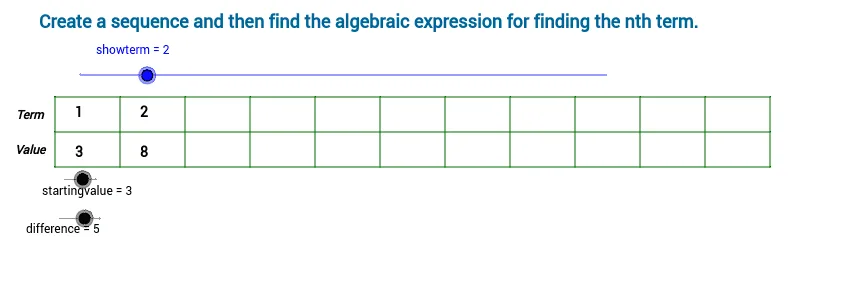
This GeoGebra example demonstrates an interactive sequence explorer that generates terms, displays them through a table or grid layout, and reveals the algebraic expression for the nth term. It covers sequences, arithmetic or recursive patterns, term indexing, algebraic expressions, function mapping, and parameter control. The construction uses the Sequence command to create list1, while objects such as startingvalue, difference, showterm, and nthterm control the first term, step, displayed terms, and nth-term text. Additional objects including cellwidth, cellheight, horizontals, verticals, verticalbars, labelx, labely, offset, offsetv, and multiple text elements build the visual layout and annotations. It is suitable for middle and high school mathematics, introductory algebra, sequence lessons, function concept reinforcement, and GeoGebra classroom demonstrations.
GeoGebra Commands & Parameters
Sequence(Segment[(x(A) + cellwidth * i, y(A)), (x(A) + cellwidth * i, y(A) + horizontals * cellheight)], i, 0.0, verticals) → verticalbarsSequence(Segment[(x(A), y(A) + i * cellheight), (x(A) + verticals * cellwidth, y(A) + i * cellheight)], i, 0.0, horizontals) → list1
AI Drawing Prompt Reference
Create a sequence explorer that displays the terms of a sequence through a table or grid layout and reveals the algebraic expression for the nth term. Use the Sequence command to create the sequence, and control the starting value, step, and displayed terms with sliders. Draw vertical and horizontal line segments to build the table layout and add labels to annotate the x-axis and y-axis.
The prompt above was compiled from the original drawing commands and is for reference only.