
Exploring Roots
Loading the math board and drawing, please wait…
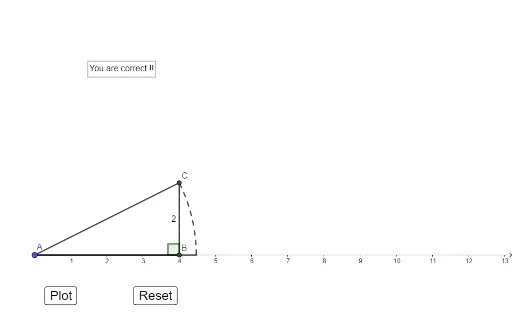
This example demonstrates the concept of roots through subtraction and indefinite integration. It uses linear functions and statistical characteristics to analyze the properties of roots. Constructed with GeoGebra commands such as Segment, If, CircleArc, etc., it is suitable for high school mathematics education.
GeoGebra Commands & Parameters
Segment(A, B) → fSegment(B, C) → hIf(0 < c < 1, Segment[Dilate[A, c, A], Dilate[B, c, A]], If[c ≥ 1, Segment[A, B]]) → gIf(1 < c < 2, Segment[Dilate[B, c - 1, B], Dilate[C, c - 1, B]], If[c ≥ 2, Segment[B, C]]) → iSegment(A, C) → jIf(2 < c < 3, Segment[Dilate[A, c - 2, A], Dilate[C, c - 2, A]], If[c ≥ 3, Segment[A, C]]) → kIf(3 < c ≤ 4, Rotate[k, α, A]) → lIf(3 < c ≤ 4, Rotate[C, α, A]) → DCircleArc(A, D, C) → dAngle(C, B, A) → β
AI Drawing Prompt Reference
Draw a triangle with one side divided into two segments and another side also divided into two segments, with the third side connecting the endpoints. Inside the triangle, based on a variable parameter, dynamically show segments starting from a vertex that slide along the sides, extending or rotating as the parameter changes. When the parameter is in a specific range, one side rotates around a vertex, forming a circular arc, while another vertex also rotates, creating an angle marker. The overall figure illustrates the concept of roots through segments, arcs, and angles, relating to functions and integrals.
The prompt above was compiled from the original drawing commands and is for reference only.