
Exploring Pythagoras Theorem
Loading the math board and drawing, please wait…
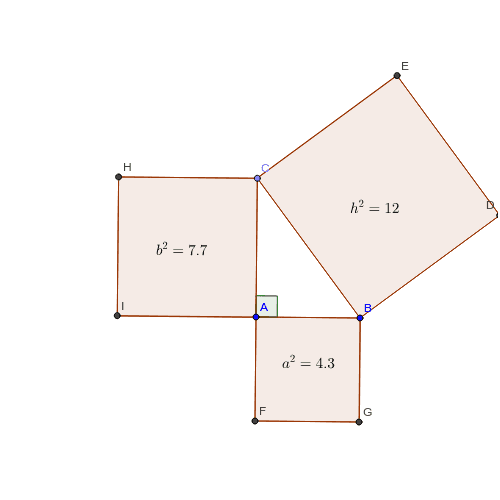
This example helps students explore the Pythagorean Theorem. It constructs a right triangle and demonstrates that the sum of the squares of the lengths of the two legs is equal to the square of the length of the hypotenuse. Key mathematical concepts include triangles, right triangles, and the Pythagorean Theorem. It uses Segment, OrthogonalLine, Point, Angle, Polygon commands in GeoGebra. Suitable for middle school and above students for geometric construction.
GeoGebra Commands & Parameters
Segment(A, B) → aOrthogonalLine(A, a) → b_1Point(b_1) → CSegment(C, A) → b_3Angle(B, A, C) → αSegment(C, B) → hPolygon(C, B, 4) → poly3, c, d, e, f, D, EPolygon(B, A, 4) → poly1, g, i, j, k, F, GPolygon(A, C, 4) → poly2, l, m, n, p, H, I
AI Drawing Prompt Reference
Draw a right triangle ABC with A as the right angle vertex. First, draw line segment AB, then draw a perpendicular line to AB through point A, intersecting at point C to form right triangle ABC. Next, measure the angle BAC, then draw line segment BC. Finally, draw four small squares around points A, B, and C to observe the relationship between the two legs and the hypotenuse of the right triangle, and verify the Pythagorean theorem.
The prompt above was compiled from the original drawing commands and is for reference only.