
Volumes of Revolution Exploration
Loading the math board and drawing, please wait…
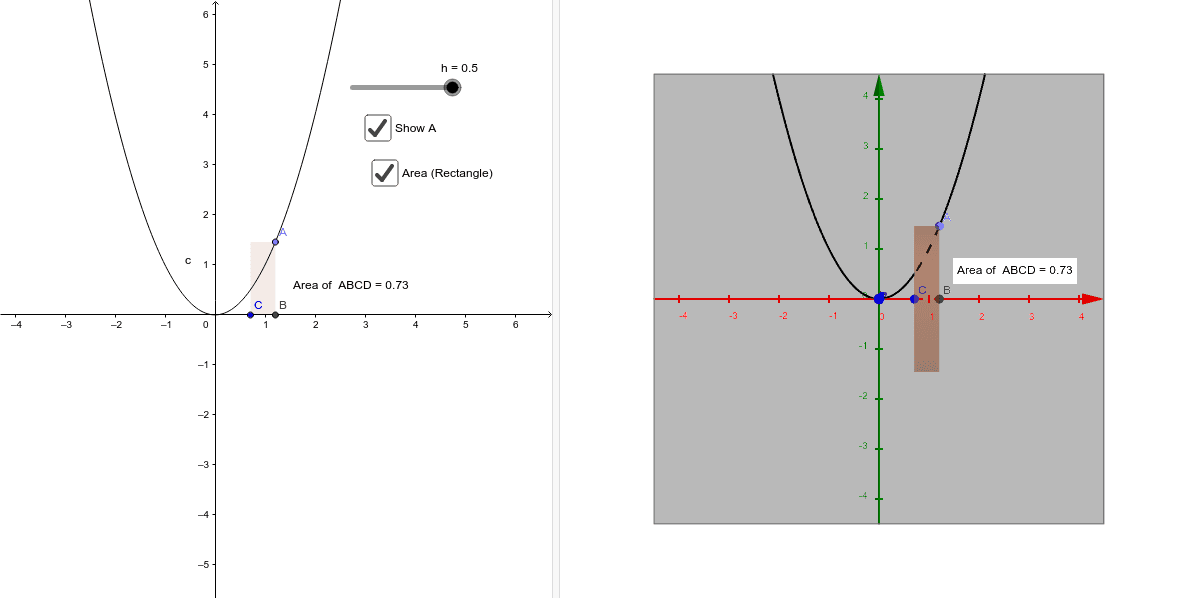
This example demonstrates the process of generating 3D solids of revolution by rotating 2D shapes and calculating their volumes. It involves core mathematical concepts such as volumes of revolution, integral applications in calculus, and function graphs with transformations. Key GeoGebra commands and objects used include Point, OrthogonalLine, Intersect, Vector, Translate, Polygon, PointIn, and Cylinder to construct the rotating shapes and compute volumes. Suitable for high school and above students to learn and understand the application of calculus in geometry, as well as for related demonstrations and teaching purposes.
GeoGebra Commands & Parameters
Point(c) → AOrthogonalLine(A, xAxis) → aIntersect(a, xAxis) → BVector(A, B) → uTranslate(B, u) → B'Vector(B, B') → vOrthogonalLine(C, xAxis, xOyPlane) → bOrthogonalLine(A, b, xOyPlane) → dIntersect(b, d) → DPolygon(A, B, C, D) → poly1, a_1, b_1, c_1, d_1PointIn(poly1) → Pointpoly1Cylinder(C, B, Distance[A, B]) → g, k, p, i
AI Drawing Prompt Reference
Create a cylinder with base as a quadrilateral formed by points A, B, C, and D, where D is the intersection of lines b and d, b is perpendicular to the x-axis, and d is perpendicular to the line from C to the x-axis. Point B is obtained by translating point A along a line perpendicular to the x-axis, and the vector u is perpendicular to AB. Place a point inside the quadrilateral and draw a cylinder with the quadrilateral as the base and the distance between A and B as the height.
The prompt above was compiled from the original drawing commands and is for reference only.