
Exploring Polynomials with Parameters
Loading the math board and drawing, please wait…
In collections
学习 GeoGebra 经典应用
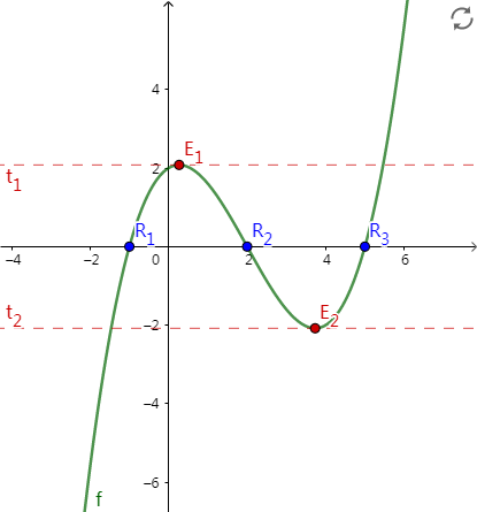
This example uses sliders to adjust polynomial parameters, helping learners explore the characteristics of polynomial graphs. Key concepts include polynomial functions, extrema, roots, and tangents. Commands used include Extremum, Root, and Tangent. Suitable for high school math education.
GeoGebra Commands & Parameters
Extremum(f) → E_1, E_2Root(f) → R_1, R_2, R_3Tangent(E_1, f) → t_1Tangent(E_2, f) → t_2
AI Drawing Prompt Reference
Graph a polynomial function with adjustable sliders to control its parameters. The curve should display two extreme points (one maximum and one minimum) clearly marked, along with three x-intercepts (roots) where the curve crosses the axis. Draw tangent lines at both extreme points to illustrate the instantaneous rate of change. The entire visualization should allow dynamic adjustment through sliders, showing how the curve, extreme points, and tangents change as parameters are modified.
The prompt above was compiled from the original drawing commands and is for reference only.