
Exploring Polygon Relationships
Loading the math board and drawing, please wait…
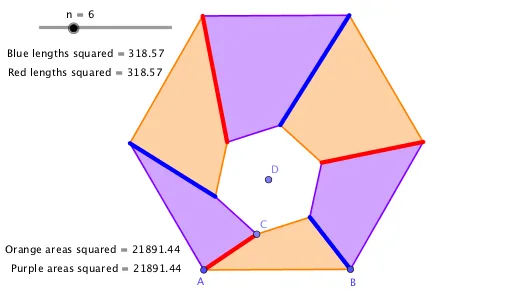
This example demonstrates dynamically constructing one polygon inside another and exploring their geometric relationships. Core math concepts include polygon construction, area calculation, geometric transformations, quadratic equations, equilateral triangles, symmetry, and statistical characteristics. GeoGebra commands used in construction are Intersect, Sequence, Polygon, PointIn, Point, and Append. Suitable for high school and above learners to understand the intrinsic connections and transformation patterns of complex geometric figures.
GeoGebra Commands & Parameters
Intersect(Ray[A, Rotate[B, ca, A]], Ray[B, Rotate[A, (-ca), B]]) → C_1Sequence(Rotate[A, (i * (360°) / n), C_1], i, 0, n - 1) → l1Polygon(l1) → q1PointIn(Polygon[A, B, C_1]) → CPoint(Segment[C, C_1]) → DSequence(Rotate[C, (i * (360°) / n), D], i, 0, n - 1) → l2Append(l1, A) → l1'Append(l2, C) → l2'Sequence(Polygon[Element[l1', i], Element[l1', i + 1], Element[l2', i + 1], Element[l2', i]], i, 1, n) → l3Sequence(Element[l3, (2 * i) - 1], i, 1, n / 2) → l3aSequence(Element[l3, (2 * i)], i, 1, n / 2) → l3bSequence(Segment[Element[l1, i], Element[l2, i]], i, 1, n) → l4Sequence(Element[l4, (2 * i) - 1], i, 1, n / 2) → l4aSequence(Element[l4, (2 * i)], i, 1, n / 2) → l4b