
Exploring Cross Sections of a Cone
Loading the math board and drawing, please wait…
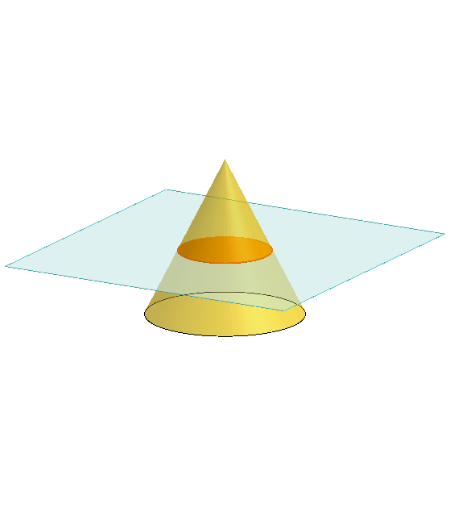
This interactive GeoGebra example dynamically demonstrates how a plane cutting through a cone produces various cross-sectional shapes, including circles, ellipses, parabolas, hyperbolas, and special cases like triangles or rhombi. The core mathematical concepts involve the generation of conic sections (quadratic curves), the intersection of a plane with a curved surface in 3D space, and how the section shape changes with the plane's inclination. Construction highlights: the cone is built using the Cone command, a cutting plane is defined with Plane, and the intersection curve is obtained via IntersectPath. Additional tools such as Translate, Rotate, and OrthogonalLine are used to adjust the plane dynamically and construct auxiliary elements. This resource is suitable for high school and above, supporting lessons in solid geometry, analytic geometry, or conic sections. It serves both as a teacher's demonstration tool and for student-led exploration, bridging 3D visualization with 2D curve analysis.
GeoGebra Commands & Parameters
Polygon(B + (-2, -2), B + (2, -2), B + (2, 2), B + (-2, 2)) → poly3, e, f, g, iPointIn(poly3) → CTranslate((0, 0, 0), Vector[B, C]) → APolygon(A + (-4, -4), A + (4, -4), A + (4, 4), A + (-4, 4)) → poly1, a, b, c, dRotate(Rotate[Translate[poly1, Vector[A, A + (0, 0, h)]], (90° * s), A + (0, 0, h), yAxis], (90° * t), A, zAxis) → poly2Rotate(D, 120°, (0, 0, 0)) → ECone((0, 0, 0), (0, 0, 4), 2) → m, e_1, oPolygon(D, E, 3, xOyPlane) → poly4, j, k, l, FPointIn(poly2) → GPointIn(poly2) → HPointIn(poly2) → IPlane(G, I, H) → nIntersectPath(n, m) → poly6OrthogonalLine(A, n) → d_1Ends(m) → g_1, g_1_1