
Exploring Corresponding Angles
Loading the math board and drawing, please wait…
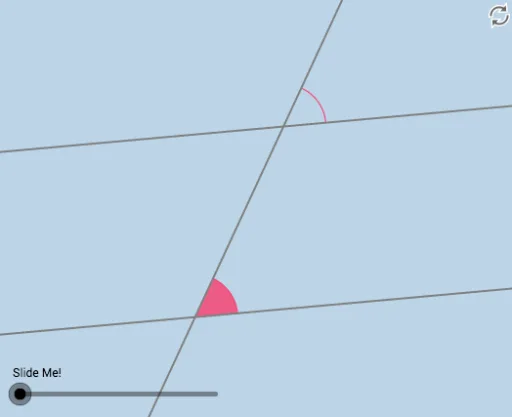
This example demonstrates the concept of corresponding angles. Key mathematical concepts include the properties of angles and the relationship between straight lines. Using GeoGebra commands such as Point, Rotate, Angle, and Line, corresponding angles can be constructed. Suitable for middle school and above students to learn geometric construction.
GeoGebra Commands & Parameters
Point(a) → BRotate(B, α, A) → B'Angle(B, A, B') → βLine(A, B') → bCircle(A, 1) → eIntersect(b, d) → CCircle(C, 1) → fIntersect(e, a) → D, EIntersect(e, b) → F, GIntersect(f, b) → H, IIntersect(f, d) → J, KCircleSector(C, K, I) → gCircleSector(C, I, J) → hCircleSector(C, J, H) → kCircleSector(C, H, K) → pCircleSector(A, E, G) → qCircleSector(A, G, D) → rCircleSector(A, D, F) → sCircleSector(A, F, E) → tDilate(A, If[0 < i < 1, 1 - i, 0], C) → A'Vector(A, A') → uTranslate(q, u) → q'Translate(r, u) → r'Translate(s, u) → s'Translate(t, u) → t'CircleArc(A, E, G) → c_1CircleArc(C, K, I) → d_1CircleArc(C, I, J) → e_1CircleArc(A, G, D) → f_1CircleArc(A, D, F) → g_1CircleArc(C, J, H) → h_1CircleArc(A, F, E) → k_1CircleArc(C, H, K) → p_1
AI Drawing Prompt Reference
Draw two parallel lines and a transversal intersecting them. Highlight the eight pairs of corresponding angles formed between the parallel lines and the transversal using sectors. Connect adjacent sectors with arcs to illustrate the angle relationships. Finally, create a symmetrical pattern of corresponding angles by translating the entire figure along the direction of the parallel lines.
The prompt above was compiled from the original drawing commands and is for reference only.