
Exploring Complementary and Supplementary Angles
Loading the math board and drawing, please wait…
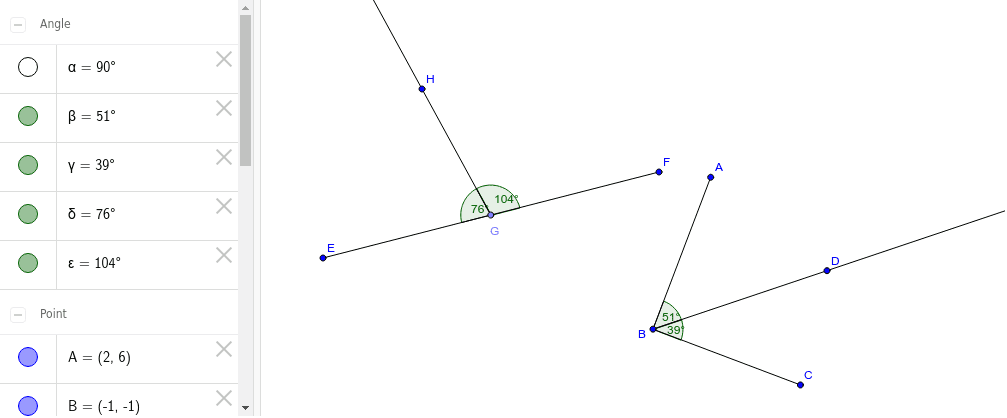
This example uses dynamic geometry tools to explore the properties of complementary and supplementary angles. It demonstrates the relationship between two angles that sum up to 90 degrees or 180 degrees. Basic geometric objects such as segments, angles, and rays are used. Suitable for middle school mathematics education, helping students understand the basic concepts of angles and their applications.
GeoGebra Commands & Parameters
Segment(A, B) → aSegment(B, C) → bAngle(C, B, A) → αRay(B, D) → cAngle(D, B, A) → βAngle(C, B, D) → γSegment(E, F) → dPoint(d) → GRay(G, H) → eAngle(H, G, E) → δAngle(F, G, H) → ε
AI Drawing Prompt Reference
Draw a triangle ABC with AB and BC as two sides, and angle ABC as α. Then draw a ray BD from point B, forming angles ABD and CBD, which are β and γ respectively. Finally, draw a line segment EF, take a point G on it, and draw a ray GH from G, forming angles EFG and FGH, which are δ and ε respectively.
The prompt above was compiled from the original drawing commands and is for reference only.