
Exploring Addition and Subtraction of Directed Numbers
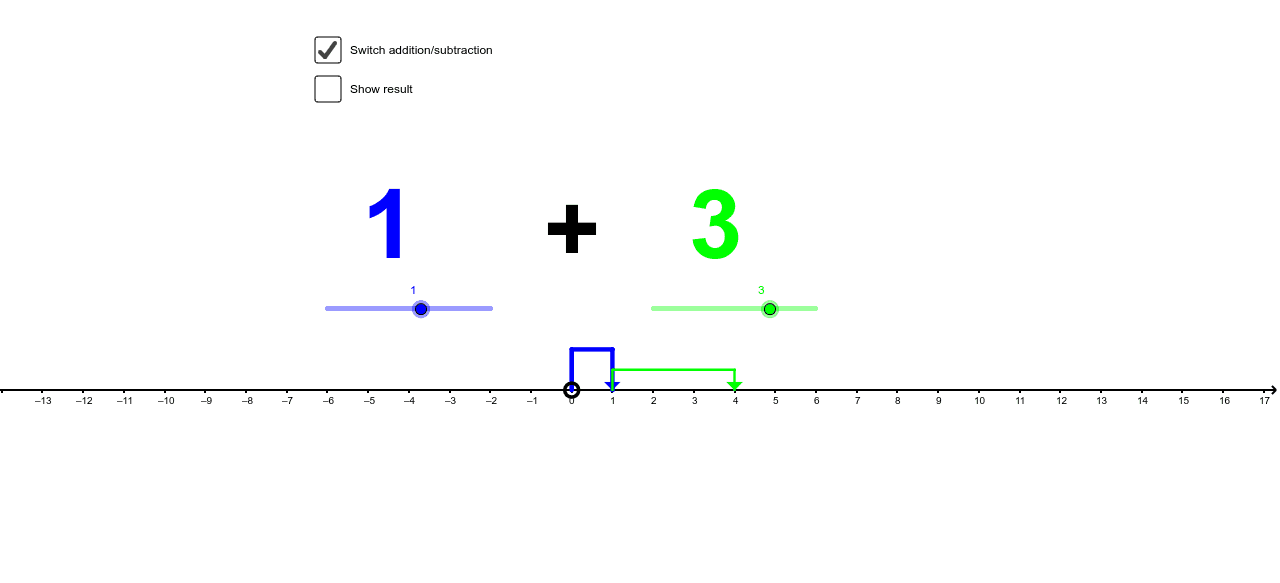
Loading the math board and drawing, please wait…
This example demonstrates the operations of directed numbers using GeoGebra, combining arithmetic with geometric visualization. Key mathematical concepts include directed numbers, vectors, and coordinate geometry. Construction involves commands like Polygon, Rotate, and Translate to create and transform shapes. Suitable for middle school students learning directed numbers or for teaching geometry and algebra integration.
GeoGebra Commands & Parameters
Polygon(A, N, M) → poly1, m, a_1, nRotate(A, 90*°) → A'Rotate(N, 90*°) → N'Rotate(M, 90*°) → M'Polygon(A', N', M') → poly1', m', a', n'Rotate(A, -90*°) → A'_1Rotate(N, -90*°) → N'_1Rotate(M, -90*°) → M'_1Polygon(A'_1, N'_1, M'_1) → poly1'_1, m'_1, a'_1, n'_1Translate(A'_1, Vector[(a, 0)]) → ETranslate(N'_1, Vector[(a, 0)]) → FTranslate(M'_1, Vector[(a, 0)]) → GPolygon(E, F, G) → poly2, g_1, e_1, fTranslate(A', Vector[(a + b, 0)]) → A''Translate(N', Vector[(a + b, 0)]) → N''Translate(M', Vector[(a + b, 0)]) → M''Polygon(A'', N'', M'') → poly1'', m'', a'', n''Translate(A', Vector[(a - b, 0)]) → A''_1Translate(N', Vector[(a - b, 0)]) → N''_1Translate(M', Vector[(a - b, 0)]) → M''_1Polygon(A''_1, N''_1, M''_1) → poly1''_1, m''_1, a''_1, n''_1Translate(A'_1, Vector[(a + b, 0)]) → HTranslate(N'_1, Vector[(a + b, 0)]) → ITranslate(M'_1, Vector[(a + b, 0)]) → JPolygon(H, I, J) → poly3, j_1, h_1, i_1Translate(A'_1, Vector[(a - b, 0)]) → KTranslate(N'_1, Vector[(a - b, 0)]) → LTranslate(M'_1, Vector[(a - b, 0)]) → OPolygon(K, L, O) → poly4, o, k_1, l_1Segment(A, (0, 1)) → pSegment((0, 1), (a, 1)) → qSegment((a, 1), (a, 0)) → rSegment((a, 0), (a, 0.5)) → sSegment((a, 0.5), (a + b, 0.5)) → tSegment((a + b, 0.5), (a + b, 0)) → b_1Segment((0, 0), (0, -1)) → c_1Segment((0, -1), (a + b, -1)) → d_1Segment((a + b, -1), (a + b, 0)) → f_1Segment((a, 0.5), (a - b, 0.5)) → m_1Segment((a - b, 0.5), (a - b, 0)) → n_1Segment((0, -1), (a - b, -1)) → p_1Segment((a - b, -1), (a - b, 0)) → q_1Segment((a, 0.5), (a + b, 0.5)) → r_1Segment((a + b, 0.5), (a + b, 0)) → s_1
AI Drawing Prompt Reference
Draw a triangle with points A, N, and M, then rotate it 90 degrees around the origin to form a new triangle A', N', M'. Next, translate A', N', and M' along the positive x-axis by a units to form a new triangle E, F, G. Then, translate A', N', and M' along the positive x-axis by a+b units to form a new triangle A'', N'', M''. After that, translate A', N', and M' along the negative x-axis by a units to form a new triangle A'_1, N'_1, M'_1. Finally, translate A'_1, N'_1, and M'_1 along the positive x-axis by a+b units to form a new triangle H, I, J. Pay attention to the changes and relationships of the triangles throughout the process.
The prompt above was compiled from the original drawing commands and is for reference only.