
Exploring AAS Congruence
Loading the math board and drawing, please wait…
In collections
Triangle Congruence Demonstrations
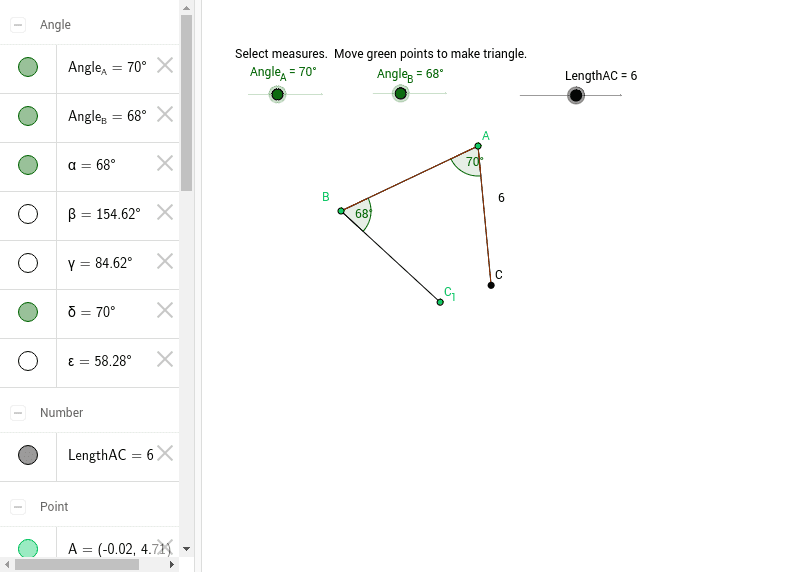
This example demonstrates whether AAS (Angle-Angle-Side) guarantees two triangles are congruent. It involves core math concepts like triangle congruence criteria. Construction uses commands such as Rotate, Angle, Ray, Point, Segment, Polygon, and objects like text1, Angle_B, Angle_A, etc., to create and label angles and sides. Suitable for middle school and above, for teaching and applying AAS congruence.
GeoGebra Commands & Parameters
Rotate(A, -Angle_B, B) → B'Angle(B', B, A) → αRay(B, B') → aPoint(a) → C_1Segment(B, C_1) → bSegment(B, A) → cAngle(D, A, B) → βRotate(D, -(β - Angle_A), A) → CAngle(C, A, D) → γSegment(A, C) → dAngle(C, A, B) → δSegment(B, C_1) → eSegment(C_1, C) → fPolygon(B, C, A) → poly1, a_1, b_1, c_1Segment(C, B) → gSegment(B, A) → hAngle(A, C, B) → ε
AI Drawing Prompt Reference
Draw two triangles to demonstrate the AAS congruence condition. Start by drawing a triangle and marking two angles and the included side. Then rotate the included side to the position of the other angle, forming a second triangle to show their congruence. Label all angles and sides, using different colors or thicknesses to clearly illustrate the congruence relationship.
The prompt above was compiled from the original drawing commands and is for reference only.