
Explore Triangle Area and Height
Loading the math board and drawing, please wait…
In collections
Area of Surfaces
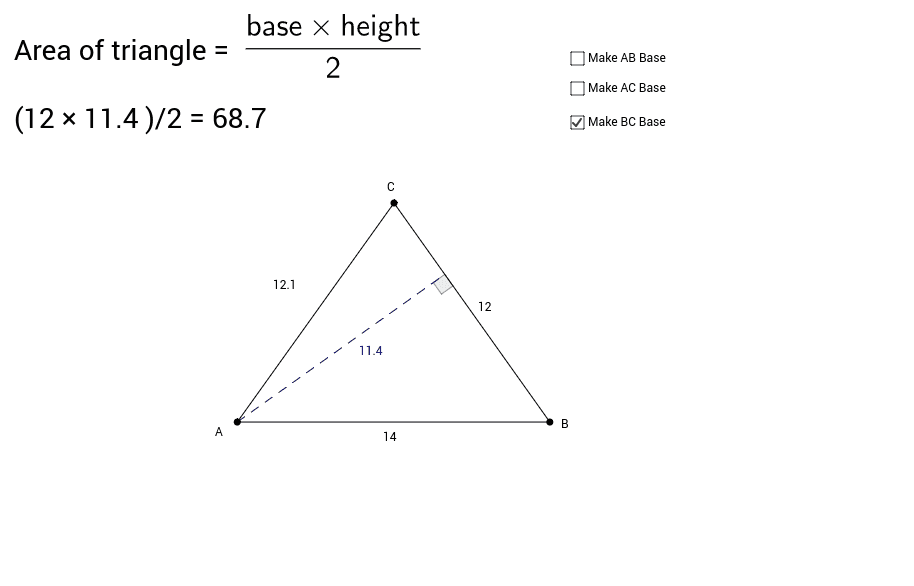
① This interactive GeoGebra activity lets students explore the area of different triangles by dragging vertices, and understand that the height is the perpendicular segment from a vertex to the opposite side (or its extension). ② Core math concepts include the triangle area formula (Area = base × height ÷ 2), the definition of altitude/height, perpendicularity, and how changing vertex positions affects the area while the base remains fixed. ③ Construction details: The triangle ABC is built using the Polygon command; lines through vertices perpendicular to opposite sides are created with Line and OrthogonalLine; Intersect finds the foot of the perpendicular; Segment draws the altitude; Angle marks the right angle; text objects display side lengths and area values dynamically. ④ Suitable for middle school geometry classes or upper elementary enrichment, this activity serves as a hands-on investigation to reinforce the concept that height must be perpendicular to the base and to verify the area formula across various triangle shapes.
GeoGebra Commands & Parameters
Polygon(A, B, C) → poly1, c, a, bLine(A, B) → dLine(A, C) → eLine(B, C) → fOrthogonalLine(A, f) → gIntersect(g, f) → DSegment(A, D) → hAngle(A, D, B) → αOrthogonalLine(C, d) → iOrthogonalLine(B, e) → jIntersect(i, d) → ESegment(C, E) → kAngle(C, E, A) → βIntersect(j, e) → FSegment(B, F) → lAngle(A, F, B) → γAngle(B, D, A) → δAngle(B, F, A) → εAngle(A, E, C) → ζ
AI Drawing Prompt Reference
Draw a triangle with draggable vertices to explore its area. Show perpendicular segments from each vertex to the opposite side, marking the foot of the perpendicular and the right angles. Display dynamically updated side lengths and area values, illustrating the relationship between height and area.
The prompt above was compiled from the original drawing commands and is for reference only.