
Explore the Surface Area of a Sphere
Loading the math board and drawing, please wait…
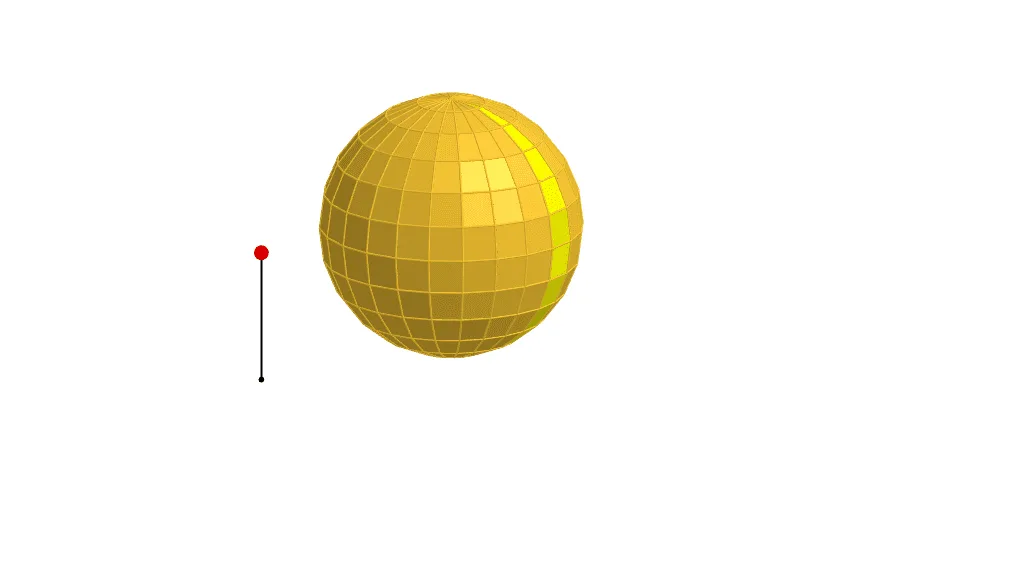
This example demonstrates the relationship between the surface area and volume of a sphere. Key mathematical concepts include the formula for the surface area of a sphere and its connection to volume. Using GeoGebra commands such as rotation, mirroring, and translation, the example dynamically shows changes in the surface area of a sphere. Suitable for high school mathematics education and learning.
GeoGebra Commands & Parameters
Line((0, 0, 1), (0, 1, 1)) → cSequence(Rotate[(0, 0, 0), ((-((i * 15))))°, c], i, 0, 6) → list1Rotate(list1, 15°, zAxis) → list1'Line(Element[list1, 2], Element[list1', 2]) → l1Line((0, 0, 0), l1) → l0Sequence(Polygon[Element[list1, i], Element[list1', i], Element[list1', i + 1], Element[list1, i + 1]], i, 1, 6) → list2Segment(A, A + (0, 0, 1)) → aPoint(a) → PIf(z(P) ≥ 0.5, 0, (2 * (0.5 - z(P)))) → tIf(z(P) ≥ 0.5, (2 * (1 - z(P))), 1) → sTranslate(list2, Vector[(s * Vector[(0, 0, 0), (1, 0, 0)])]) → list2'Translate(l0, Vector[(s * Vector[(0, 0, 0), (1, 0, 0)])]) → l0'Sphere((0, 0, 1), 1) → bSequence(Pyramid[Element[list2, i], (0, 0, 1)], i, 1, 6) → list3Translate(list3, Vector[(s * Vector[(0, 0, 0), (1, 0, 0)])]) → list3'Line(Element[list1, 3], Element[list1', 3]) → l2Line(Element[list1, 4], Element[list1', 4]) → l3Line(Element[list1, 5], Element[list1', 5]) → l4Line(Element[list1, 6], Element[list1', 6]) → l5Line(Element[list1, 7], Element[list1', 7]) → l6Rotate(Element[list3', 1], ((t * 7.5))°, l0') → dTranslate(l1, Vector[(s * Vector[(0, 0, 0), (1, 0, 0)])]) → l1'Translate(l2, Vector[(s * Vector[(0, 0, 0), (1, 0, 0)])]) → l2'Translate(l3, Vector[(s * Vector[(0, 0, 0), (1, 0, 0)])]) → l3'Translate(l4, Vector[(s * Vector[(0, 0, 0), (1, 0, 0)])]) → l4'Rotate(l1', (7.5° * t), l0') → l1''Rotate(Rotate[Element[list3', 2], ((t * 7.5))°, l0'], ((t * 15))°, l1'') → eRotate(Rotate[l2', ((t * 7.5))°, l0'], ((t * 15))°, l1'') → l2''Rotate(Rotate[Rotate[Element[list3', 3], ((t * 7.5))°, l0'], ((t * 15))°, l1''], ((t * 15))°, l2'') → fRotate(Rotate[Rotate[l3', ((t * 7.5))°, l0'], ((t * 15))°, l1''], ((t * 15))°, l2'') → l3''Rotate(Rotate[Rotate[Rotate[Element[list3', 4], ((t * 7.5))°, l0'], ((t * 15))°, l1''], ((t * 15))°, l2''], (15° * t), l3'') → gRotate(Rotate[Rotate[Rotate[l4', ((t * 7.5))°, l0'], ((t * 15))°, l1''], ((t * 15))°, l2''], ((t * 15))°, l3'') → l4''Rotate(Rotate[Rotate[Rotate[Rotate[Element[list3', 5], ((t * 7.5))°, l0'], ((t * 15))°, l1''], ((t * 15))°, l2''], (15° * t), l3''], (15° * t), l4'') → hTranslate(l5, Vector[(s * Vector[(0, 0, 0), (1, 0, 0)])]) → l5'Rotate(Rotate[Rotate[Rotate[Rotate[l5', ((t * 7.5))°, l0'], ((t * 15))°, l1''], ((t * 15))°, l2''], ((t * 15))°, l3''], (15° * t), l4'') → l5''Rotate(Element[list2', 1], ((t * 7.5))°, l0') → poly1Rotate(Rotate[Rotate[Rotate[Rotate[Rotate[Element[list3', 6], ((t * 7.5))°, l0'], ((t * 15))°, l1''], ((t * 15))°, l2''], (15° * t), l3''], (15° * t), l4''], (15° * t), l5'') → iRotate(Rotate[Element[list2', 2], ((t * 7.5))°, l0'], ((t * 15))°, l1'') → poly2Rotate(Rotate[Rotate[Element[list2', 3], ((t * 7.5))°, l0'], ((t * 15))°, l1''], ((t * 15))°, l2'') → poly3Rotate(Rotate[Rotate[Rotate[Element[list2', 4], ((t * 7.5))°, l0'], ((t * 15))°, l1''], ((t * 15))°, l2''], (15° * t), l3'') → poly4Rotate(Rotate[Rotate[Rotate[Rotate[Element[list2', 5], ((t * 7.5))°, l0'], ((t * 15))°, l1''], ((t * 15))°, l2''], (15° * t), l3''], (15° * t), l4'') → poly5Rotate(Rotate[Rotate[Rotate[Rotate[Rotate[Element[list2', 6], ((t * 7.5))°, l0'], ((t * 15))°, l1''], ((t * 15))°, l2''], (15° * t), l3''], (15° * t), l4''], (15° * t), l5'') → poly6OrthogonalPlane((0, 0, 1), zAxis) → mTranslate(l6, Vector[(s * Vector[(0, 0, 0), (1, 0, 0)])]) → l6'Rotate(Rotate[Rotate[Rotate[Rotate[Rotate[l6', ((t * 7.5))°, l0'], ((t * 15))°, l1''], ((t * 15))°, l2''], ((t * 15))°, l3''], (15° * t), l4''], (15° * t), l5'') → l6''Rotate(Rotate[Rotate[Rotate[Rotate[Rotate[Rotate[m, ((t * 7.5))°, l0'], ((t * 15))°, l1''], ((t * 15))°, l2''], (15° * t), l3''], (15° * t), l4''], (15° * t), l5''], (7.5° * t), l6'') → nMirror(i, n) → i'Mirror(h, n) → h'Mirror(g, n) → g'Mirror(f, n) → f'Mirror(e, n) → e'Mirror(d, n) → d'Mirror(poly6, n) → poly6'Mirror(poly5, n) → poly5'Mirror(poly4, n) → poly4'Mirror(poly3, n) → poly3'Mirror(poly2, n) → poly2'Mirror(poly1, n) → poly1'Sequence(Rotate[list3, 15° + ((15° * 22) * i), zAxis], i, 0, 1) → list4Mirror(list4, m) → list4'Sequence(Rotate[list2, (15° * i), zAxis], i, 1, 23) → list5Mirror(list5, m) → list5'
AI Drawing Prompt Reference
Draw a sphere to illustrate the relationship between its surface area and volume. Use rotations, reflections, and translations to dynamically show changes in the sphere's surface area. Start by drawing a vertical line, then rotate it to create multiple points. Connect these points to form polygons, simulating the sphere's surface. Adjust the position and size of the polygons based on the sphere's height to make them fit the shape better. Finally, combine these polygons to create a 3D effect of the sphere, labeling key points and lines to observe changes in surface area and volume.
The prompt above was compiled from the original drawing commands and is for reference only.