
Explore the Orthocenter Locus in Triangles
Loading the math board and drawing, please wait…
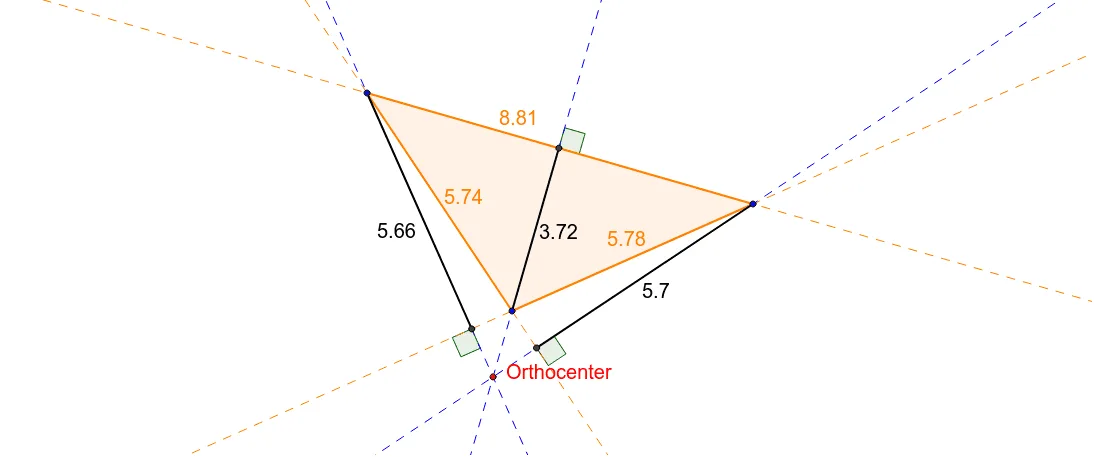
This interactive GeoGebra activity allows students to drag triangle vertices and observe how the orthocenter moves. Key mathematical concepts include orthocenter, circumcircle, altitude lines, and geometric relationships between special triangle points. Construction uses Polygon for the triangle, LineBisector for altitudes, Intersect to locate the orthocenter, and Circle for the circumcircle. Ideal for middle and high school geometry lessons, enabling students to investigate properties of the orthocenter and its relationship with the circumcenter, nine-point circle center, and other notable points.
GeoGebra Commands & Parameters
Polygon(A, B, C) → poly1, c, a, bLineBisector(c) → dLineBisector(b) → eLineBisector(a) → fIntersect(d, e) → CircumcenterCircle(Circumcenter, C) → gIntersect(g, e) → D, HIntersect(g, d) → I, JIntersect(g, f) → K, LLine(C, B) → iLine(A, B) → jLine(A, C) → kOrthogonalLine(A, i) → hOrthogonalLine(B, k) → lOrthogonalLine(C, j) → mIntersect(h, i) → EIntersect(j, m) → FIntersect(k, l) → GSegment(A, E) → nSegment(B, G) → pSegment(C, F) → qIntersect(h, m) → OrthocenterAngle(i, h) → αAngle(j, m) → βAngle(l, k) → γ
AI Drawing Prompt Reference
Draw an arbitrary triangle and construct its three altitudes, which intersect at the orthocenter. Then construct the perpendicular bisectors of the three sides, intersecting at the circumcenter. Draw the circumcircle centered at the circumcenter passing through all three vertices. Mark the orthocenter and circumcenter, and display one interior angle along with the angle between an altitude and its corresponding side. When dragging vertices, the orthocenter moves but maintains geometric relationships with the circumcenter and other notable points.
The prompt above was compiled from the original drawing commands and is for reference only.