
SSS Exploration
Loading the math board and drawing, please wait…
In collections
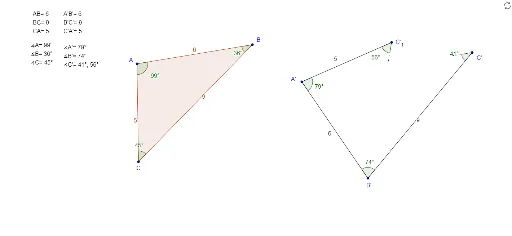
Exploring Triangle Congruence
This example demonstrates the side-side-side (SSS) criterion for triangle congruence. It involves core mathematical concepts such as triangle congruence determination and geometric construction. The construction utilizes commands like Polygon, Circle, Point, Segment, Angle, Intersect, Ray, and CircleArc. It is suitable for middle school and above students to explore and understand triangle congruence conditions, enhancing spatial reasoning skills.
GeoGebra Commands & Parameters
Polygon(A, B, C) → poly1, c, a, bCircle(A', Segment[B, A]) → dPoint(d) → B'Segment(A', B') → eCircle(A', Segment[C, A]) → fPoint(f) → C'_1Segment(A', C'_1) → gCircle(B', Segment[C, B]) → hPoint(h) → C'Segment(B', C') → iAngle(B', A', C'_1) → αAngle(C', B', A') → βAngle(C, A, B) → γAngle(A, B, C) → δAngle(B, C, A) → εAngle(A', C', B') → ζAngle(A', C'_1, B') → ηSegment(C'_1, B') → jSegment(C', A') → kPoint(k) → EPoint(j) → FSegment(C', E) → lSegment(C'_1, F) → mCircle(C', 1) → pIntersect(p, k, 1) → DSegment(C', D) → nCircle(C'_1, 1) → qIntersect(j, m) → GIntersect(j, m) → HIntersect(q, j, 1) → ISegment(C'_1, I) → rCircle(A', C'_1) → sRay(A', B') → tIntersect(s, t, 1) → JCircleArc(A', J, C'_1) → c_1Ray(B', A') → a_1Circle(B', C') → d_1Intersect(d_1, a_1, 1) → KCircleArc(B', C', K) → e_1
AI Drawing Prompt Reference
Draw a triangle and create circles using its sides. Mark intersection points and connect them to form a new triangle. Label the angles. Then, draw circles using the vertices of the new triangle, connect intersection points with segments, and create arcs to illustrate the construction of triangle congruence.
The prompt above was compiled from the original drawing commands and is for reference only.