
Explore Reference Angles
Loading the math board and drawing, please wait…
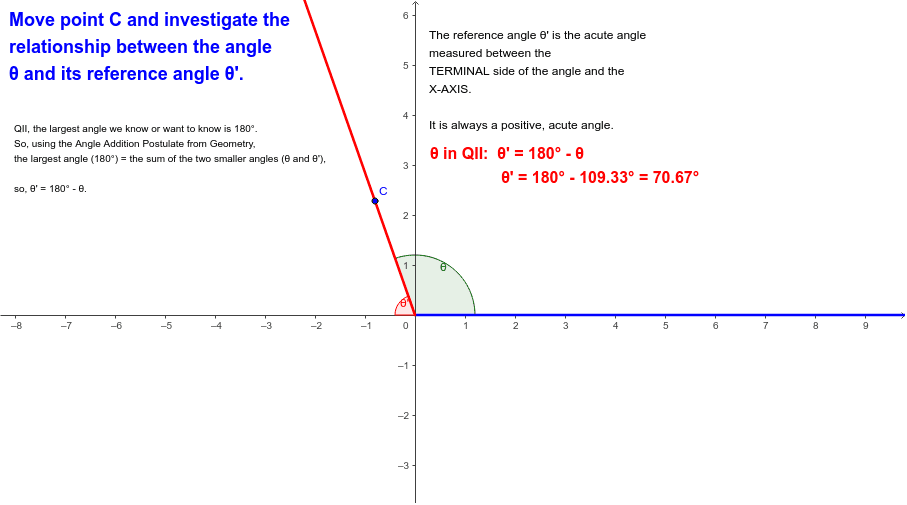
This example demonstrates how reference angles behave as a terminal side moves through different quadrants. It covers core math concepts like angles, quadrants, and reference angle definitions. Construction involves commands such as OrthogonalLine, Intersect, Angle, Ray, Point to draw angles, intersections, and rays, with text objects displaying calculations. Suitable for high school students learning trigonometric fundamentals.
GeoGebra Commands & Parameters
OrthogonalLine(C, xAxis) → cIntersect(c, xAxis) → DAngle(D, A, C) → θ'Angle(B, A, C) → θRay(A, B) → aRay(A, C) → bPoint(xAxis) → EAngle(B, A, E) → αAngle(B, A, E) → β
AI Drawing Prompt Reference
Draw a coordinate system with an x-axis and a y-axis. Mark a point on the x-axis and draw a perpendicular line from this point to the x-axis, creating another intersection point. Connect the origin to this intersection point to form a ray. Connect the origin to another point on the x-axis to form a second ray. Create an angle between the upper ray and the positive x-axis, and label its measure. Create an angle between the lower ray and the positive x-axis, and label its measure. Mark another point on the x-axis, connect the origin to this point to form a third ray. Create an angle between the upper ray and the positive x-axis, and label its measure. Create an angle between the lower ray and the positive x-axis, and label its measure.
The prompt above was compiled from the original drawing commands and is for reference only.