
Explore: Perpendicular Transversal Intersects Parallel Lines
Loading the math board and drawing, please wait…
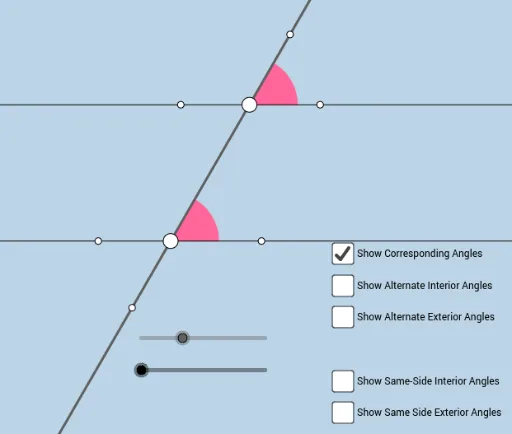
① This interactive GeoGebra applet serves as a scaffolded template to help students discover the relationships among special pairs of angles when a perpendicular transversal intersects a set of parallel lines. ② The core mathematical concepts include properties of parallel lines, perpendicularity, angle measurement, and the relationships of corresponding, alternate interior, and consecutive interior angles. ③ Construction highlights: Based on the construction summary, the applet uses GeoGebra commands such as Point, Circle, Intersect, Rotate, Angle, Line, Ray, Segment, and CircleSector, creating objects a, f, A, c, B, B', b, f', F, F', α, g, C, h, i, D, j, k, l, E, G, H, I, m, d, J, K, L, M, n, p, O, P, Q, q, r, N, e, o, s. It constructs the perpendicular transversal and its intersections with the parallel lines, then measures the relevant angles. ④ This resource is ideal for middle or high school geometry classes or self-study, enabling learners to actively explore and infer the angle relationships, thereby strengthening geometric intuition and deductive reasoning.
GeoGebra Commands & Parameters
Point(f) → ACircle(A, 2) → cIntersect(c, f, 2) → BRotate(B, (a * π / 180), A) → B'Rotate(f, (b * π / 180), A) → f'Intersect(c, f', 2) → FRotate(F, (a * π / 180), A) → F'Angle(F, A, F') → αLine(A, F') → gIntersect(c, g, 1) → CRay(A, F') → hRay(A, C) → iIntersect(c, f', 1) → DRay(A, F) → jRay(A, C) → kRay(A, D) → lPoint(l) → EPoint(h) → GPoint(k) → HPoint(j) → ILine(G, j) → mCircle(G, 1) → dIntersect(d, m) → J, KIntersect(d, h) → L, MRay(G, K) → nRay(G, J) → pPoint(n) → OPoint(p) → PIntersect(d, h, 2) → QRay(G, Q) → qSegment(A, G) → rPoint(q) → NCircle(G, 1.5) → c_1Circle(A, 1.5) → d_1Intersect(c_1, n, 1) → RIntersect(c_1, q, 1) → SIntersect(c_1, p, 1) → TIntersect(c_1, r, 1) → UIntersect(d_1, j, 1) → VIntersect(d_1, r, 1) → WIntersect(d_1, l) → Z,Intersect(d_1, k, 1) → A_1CircleSector(G, R, S) → e_1CircleSector(G, S, T) → f_1CircleSector(G, T, U) → g_1CircleSector(G, U, R) → h_1CircleSector(A, V, W) → k_1CircleSector(A, W, Z) → p_1CircleSector(A, Z, A_1) → q_1CircleSector(A, A_1, V) → r_1
AI Drawing Prompt Reference
Draw two parallel lines and a perpendicular line intersecting them at two points. Draw a circle centered at one of the intersection points, intersecting the perpendicular line at two points. Rotate these two points around the center point by a certain angle to get two more points. Connect these points to form several angles, measure and label their sizes to show the relationships among corresponding, alternate interior, and consecutive interior angles.
The prompt above was compiled from the original drawing commands and is for reference only.