
Explore Perimeter and Area of Rectangles
Loading the math board and drawing, please wait…
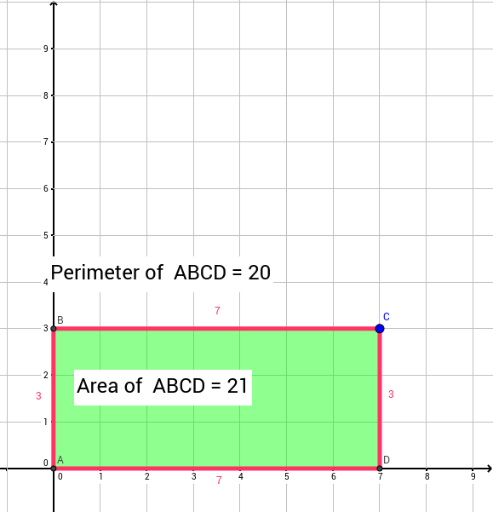
This example explores the perimeter and area of rectangles using the coordinate axis. It demonstrates basic geometric properties of rectangles, involving key math concepts such as area, perimeter, and random experiments. Using GeoGebra commands like Intersect, OrthogonalLine, and Polygon, you can dynamically adjust the side lengths of the rectangle and observe changes in perimeter and area. Suitable for middle school and above students to learn geometry and probability statistics.
GeoGebra Commands & Parameters
Intersect(xAxis, yAxis) → AOrthogonalLine(C, yAxis) → aOrthogonalLine(C, a) → bIntersect(a, yAxis) → BIntersect(b, xAxis) → DPolygon(A, B, C, D) → poly1, a_1, b_1, c, dTextfield(text1) → InputBox1Textfield() → InputBox2PointIn(poly1) → Pointpoly1_1Perimeter(poly1) → perimeterpoly1PointIn(poly1) → Pointpoly1_2PointIn(poly1) → Pointpoly1_3Perimeter(poly1) → ePointIn(poly1) → Pointpoly1_4Perimeter(poly1) → fPointIn(poly1) → Pointpoly1