
Example 10: Geometric Mechanism
Loading the math board and drawing, please wait…
In collections
Realidades de GeoGebra
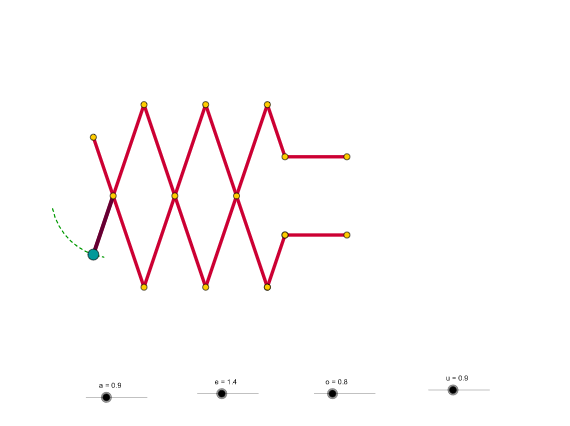
This example demonstrates geometric mechanisms using GeoGebra. It covers core concepts such as angles, transformations, and coordinate systems. Commands used include Circle, Point, CircleSector, Intersect, Ray, Segment, OrthogonalLine, Mirror, Line, and CircleArc. Suitable for high school geometry.
GeoGebra Commands & Parameters
Circle(A, a) → cPoint(c) → BPoint(c) → CCircleSector(A, B, C) → dIntersect(c, d, 1) → DIntersect(c, d, 1) → EPoint(d) → IPoint(d) → JRay(J, A) → bCircle(A, e) → fIntersect(f, b) → K,Segment(L, M) → gOrthogonalLine(K, g) → hOrthogonalLine(A, h) → iSegment(J, K) → jMirror(J, i) → J'Mirror(K, i) → K'Segment(J', K') → j'Mirror(K, h) → K'_1Mirror(K', h) → K''Circle(K, (2 * e)) → kMirror(J, i) → J'_1Mirror(A, i) → A'Ray(J'_1, A') → b'Line(K, b') → lLine(K', b) → mIntersect(k, l, 2) → NMirror(N, i) → N'Segment(K, N) → nSegment(K', N') → pLine(N', h) → qMirror(K', q) → K''_1Mirror(N', q) → N''Segment(K''_1, N'') → p'Mirror(K, q) → K'_2Mirror(N, q) → N'_1Segment(K'_2, N'_1) → n'Line(K'_2, b') → rCircle(K'_2, o) → sIntersect(s, r, 2) → OSegment(K'_2, O) → tLine(O, i) → a1Circle(O, u) → c1Intersect(c1, a1, 1) → PSegment(O, P) → b1Mirror(K'_2, i) → QMirror(O, i) → O'Segment(Q, O') → t'Mirror(O, i) → O'_1Mirror(P, i) → P'Segment(O'_1, P') → b1'Segment(J, A) → d1CircleArc(A, B, C) → e1Intersect(p, n) → FIntersect(p, n) → GIntersect(n', p') → H
AI Drawing Prompt Reference
Draw a geometric mechanism featuring a circle and its center, with two points on the circle forming a sector. The intersection points of the sector with the circle create rays. Construct additional elements like perpendicular lines and segments using these points. Apply mirror operations to generate symmetrical shapes and connect key points to form closed figures and curves.
The prompt above was compiled from the original drawing commands and is for reference only.