
Exact Values on the Unit Circle (Degrees) by Paul Sutton
Loading the math board and drawing, please wait…
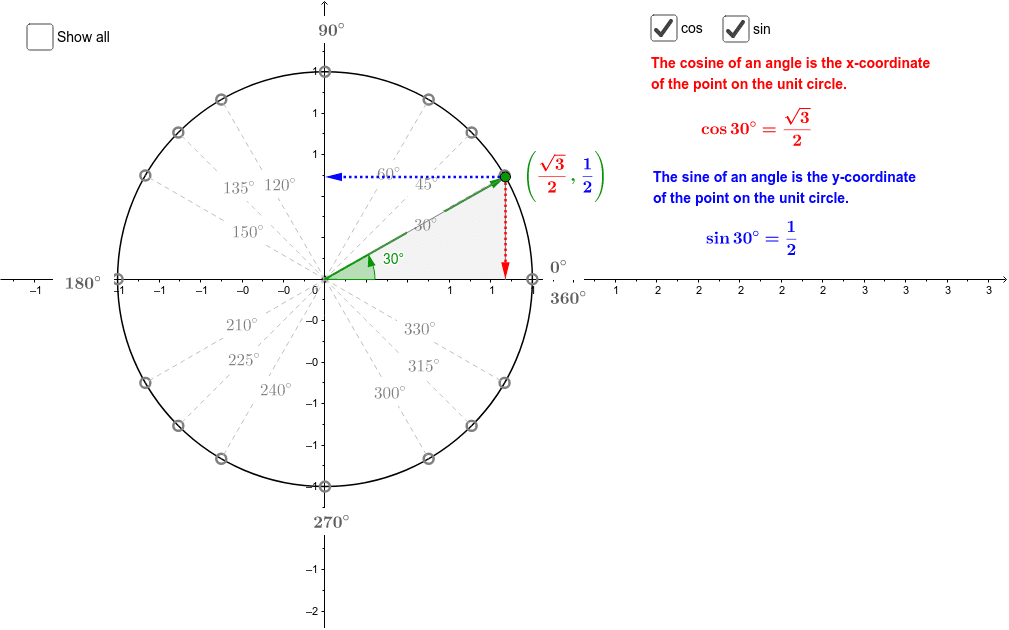
This example demonstrates how to mark and calculate the exact trigonometric values for specific angles (e.g., 30°, 45°, 60°) on the unit circle. It involves core math concepts like the unit circle, trigonometric values, special angles, and properties of right triangles. GeoGebra commands used include Intersect, Point, Circle, Segment, Distance, Angle, Vector, and Polygon for construction. Suitable for high school students learning the application of trigonometric functions on the unit circle.
GeoGebra Commands & Parameters
Intersect(xAxis, yAxis) → OPoint(xAxis) → ECircle(O, E) → c_1Point(c_1) → XSegment(O, X) → aDistance(X, A_1) → bAngle(E, O, X) → αSegment(A_1, (x(A_1), 0)) → fSegment(A_2, (x(A_2), 0)) → gSegment(B_2, B_1) → hSegment(C_2, C_1) → iVector(O, X) → uVector(X, (x(X), 0)) → vVector(X, (0, y(X))) → wPoint(u) → ASegment(A, C_2) → eSegment(A, B_2) → jSegment(A, A_2) → kSegment(A, A_3) → lSegment(A, B_3) → mSegment(A, C_3) → nSegment(A, C_4) → pSegment(A, B_4) → qSegment(A, A_4) → rSegment(A, A_1) → s_1Segment(A, B_1) → tSegment(A, C_1) → a_1Polygon(X, (x(X), 0), A) → poly1, a_2, B, b_1Polygon((abs(x(X)), abs(y(X))), A, (abs(x(X)), 0)) → poly2, d_1, e_1, a_3
AI Drawing Prompt Reference
Draw a unit circle in a coordinate system and mark points corresponding to special angles like 30°, 45°, and 60° on the circle. Connect these points with line segments to form right triangles, and draw vectors to represent position vectors on the unit circle. Label the angles and distances to clearly demonstrate the exact trigonometric values.
The prompt above was compiled from the original drawing commands and is for reference only.