
Unit Circle and Sine Function by Paul Sutton
Loading the math board and drawing, please wait…
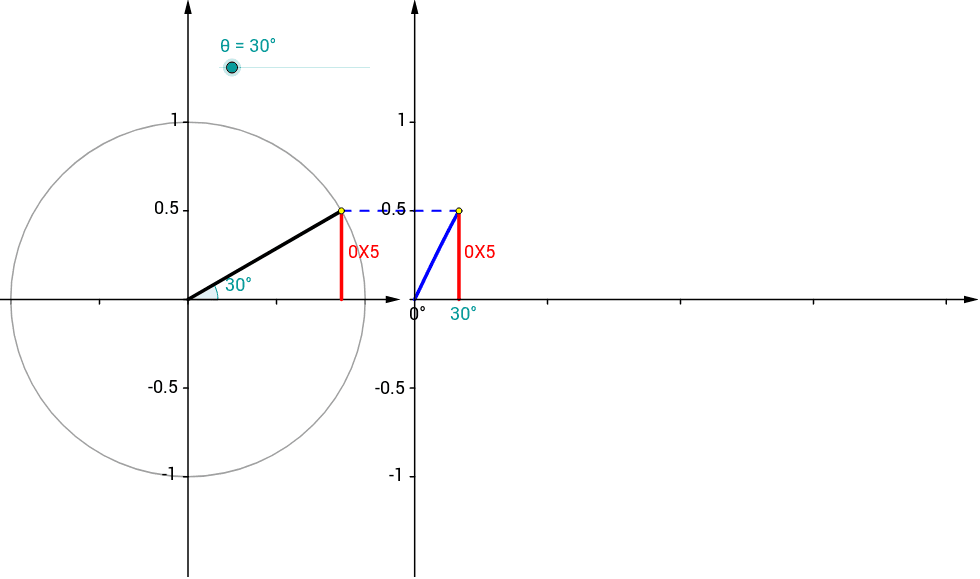
This example demonstrates the relationship between the unit circle and the sine function. Key mathematical concepts include trigonometry and the unit circle. It uses GeoGebra commands such as Point, Rotate, Angle, Function, Segment, Circle, Vector, and Sequence. Suitable for high school mathematics education and learning.
GeoGebra Commands & Parameters
Point(Ray[(0, 0), (-1, 0)]) → BRotate(A, θ, B) → PRotate(A, θ, B) → A'Angle(A, B, A') → αRotate(A, θ, B) → A'_1Angle(A, B, A'_1) → βFunction(sin(120° * x), 0, x(Q)) → fSegment(Q, (x(Q), 0)) → eCircle(B, A) → cSegment(B, P) → aVector((x(B), y(Corner[1])), (x(B), y(Corner[4]))) → uVector((0, y(Corner[1])), (0, y(Corner[4]))) → wVector((0, 0), (x(Corner[2]), 0)) → zSequence(Segment[(0.75 * i, 0), (0.75 * i, -0.025)], i, 1, 4) → list1Segment(P, (x(P), 0)) → bVector(B - (1.2, 0), B + (1.2, 0)) → vSequence(Segment[(0, 0.5 * i - 1), (-0.025, 0.5 * i - 1)], i, 0, 4) → list2Sequence(Segment[(x(B), 0.5 * i - 1), (x(B) - 0.025, 0.5 * i - 1)], i, 0, 4) → list3Segment(P, Q) → dSequence(Segment[B + (0.5 * i - 1, 0), B + (0.5 * i - 1, -0.025)], i, 0, 4) → list4Point(Ray[(0, 0), (-1, 0)]) → B_1Rotate(A_1, θ, B_1) → P_1Rotate(A_1, θ, B_1) → A'_2Rotate(A_1, θ, B_1) → A'_3Circle(B_1, A_1) → c_1Segment(B_1, P_1) → a_1
AI Drawing Prompt Reference
Draw a unit circle with a point on it and a ray starting from that point. Rotate the ray counterclockwise by an angle to get a new point, and connect the origin to this point. Mark the vertical projection of this point on the circle and draw the line segments connecting the point to the origin and its projection. Also, plot a sine function that corresponds to the points on the unit circle. Finally, add some auxiliary line segments and markings around the circle to illustrate the relationship between the unit circle and the sine function.
The prompt above was compiled from the original drawing commands and is for reference only.