
Erzurum Hatuniye Madrassa Geometry Construction
Loading the math board and drawing, please wait…
In collections
Fatin Uluengin - muqarnas
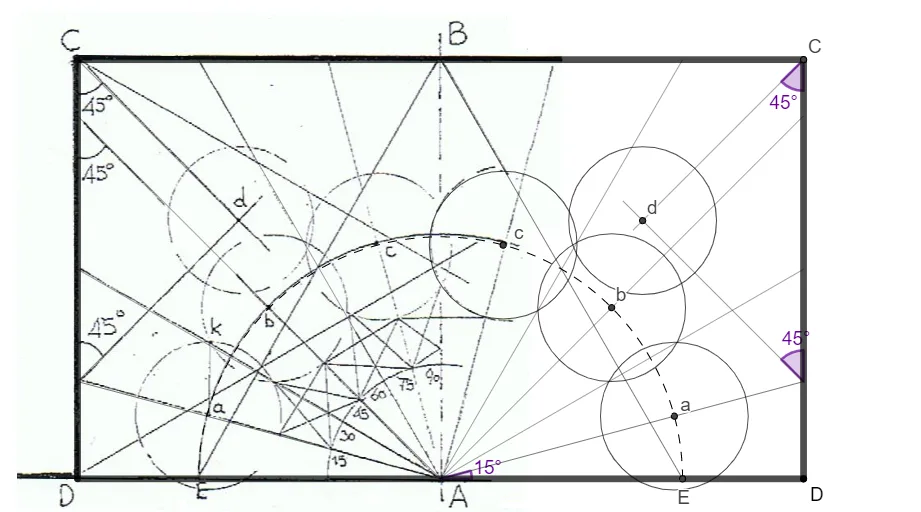
This GeoGebra example demonstrates the construction of a geometric pattern inspired by the Hatuniye madrassa in Erzurum. Using commands such as Rotate, Mirror, and Circle, the construction builds a complex figure composed of polygons and circular arcs, illustrating the interplay between trigonometric concepts (e.g., cosine) and geometric transformations (e.g., dilation and scaling). Core mathematical ideas include angle measurement, orthogonal line construction, polygon incircles, and the use of midpoints and radii. The example is suitable for high‑school or early university students studying geometric constructions and coordinate geometry, and it can be used to show how mathematics informs architectural design.
GeoGebra Commands & Parameters
ConstructionStep() → stapRotate(O, 30°, N) → O'Ray(N, O') → fOrthogonalLine(O, xAxis) → gIntersect(g, f) → POrthogonalLine(N, xAxis) → hOrthogonalLine(P, g) → iIntersect(h, i) → QPolygon(Q, N, O, P) → vierhoek1, q, n, o, pMidpoint(N, O) → ROrthogonalLine(R, xAxis) → jPoint(j) → SPoint(j) → TSegment(S, T) → kSegment(Q, O) → lSegment(P, N) → mAngle(O, Q, P) → αAngle(Q, P, N) → βIntersect(p, k) → URotate(R, (-(30°)), U) → R'Ray(U, R') → rIntersect(n, r) → VIntersect(n, r) → WMirror(V, k) → V'Segment(U, V) → sSegment(U, V') → tAngle(W, U, R) → εAngle(R, U, V') → ζSemicircle(V, V') → cRotate(O, 15°, R) → O'_1Ray(R, O'_1) → aIntersect(o, a) → ZIntersect(c, a, 1) → A_1Segment(R, Z) → bMirror(Z, k) → Z'Segment(R, Z') → dRotate(O, 30°, R) → O'_2Angle(O, R, A_1) → ηRay(R, O'_2) → eIntersect(o, e) → C_1Segment(R, C_1) → f_1Mirror(C_1, k) → D_1Segment(R, D_1) → g_1Rotate(O, 45°, R) → O'_3Ray(R, O'_3) → h_1Intersect(o, h_1) → E_1Mirror(E_1, k) → F_1Segment(R, E_1) → i_1Segment(R, F_1) → j_1Rotate(O, 60°, R) → O'_4Ray(R, O'_4) → k_1Intersect(p, k_1) → I_1Mirror(I_1, k) → J_1Segment(R, I_1) → l_1Segment(R, J_1) → m_1Rotate(O, 75°, R) → O'_5Ray(R, O'_5) → n_1Intersect(p, n_1) → K_1Mirror(K_1, k) → L_1Segment(L_1, R) → p_1Segment(R, K_1) → q_1Intersect(c, d, 1) → B_1Intersect(c, i_1, 1) → M_1Intersect(c, j_1) → N_1,Intersect(c, q_1, 1) → O_1Intersect(c, p_1, 1) → P_1Mirror(P_1, k) → W_1Circle(B_1, G_1) → c_1Radius(c_1) → straalIntersect(c, j_1, 1) → H_1Circle(A_1, straal) → e_1Circle(H_1, straal) → d_1Circle(M_1, straal) → r_1Circle(P_1, straal) → s_1Circle(O_1, straal) → t_1Rotate(P, 45°, Z) → P'Ray(Z, P') → a_1Rotate(O, (-(45°)), P) → O'_6Ray(P, O'_6) → b_1Angle(P, Z, P') → γAngle(O'_6, P, Z) → δPoint(a_1) → Q_1Point(b_1) → R_1Segment(Z, Q_1) → f_2Segment(P, R_1) → g_2Intersect(f_2, g_2) → S_1Circle(S_1, straal) → c_2Mirror(S_1, k) → T_1Mirror(P, k) → P'_1Mirror(R_1, k) → U_1Segment(P'_1, U_1) → h_2Mirror(Z, k) → Z'_1Mirror(Q_1, k) → V_1Segment(Z'_1, V_1) → i_2Circle(T_1, straal) → d_2
AI Drawing Prompt Reference
Draw a symmetric geometric pattern composed of a quadrilateral and circular arcs. Start with a horizontal baseline and a vertical line through a central point. Rotate a ray 30 degrees from the center to intersect another vertical line, forming a four-sided polygon. Use the midpoint of one side as a new center, draw a vertical line, and place two points on it to define a symmetry axis. Mirror some points and segments across this axis to create symmetry. From the center, draw rays at 15, 30, and 45 degrees to intersect the polygon sides and a semicircle, marking points and connecting them with radial segments. Finally, add a semicircle connecting two mirrored points to complete the design.
The prompt above was compiled from the original drawing commands and is for reference only.