
Equivalent Fractions with Larger Denominators
Loading the math board and drawing, please wait…
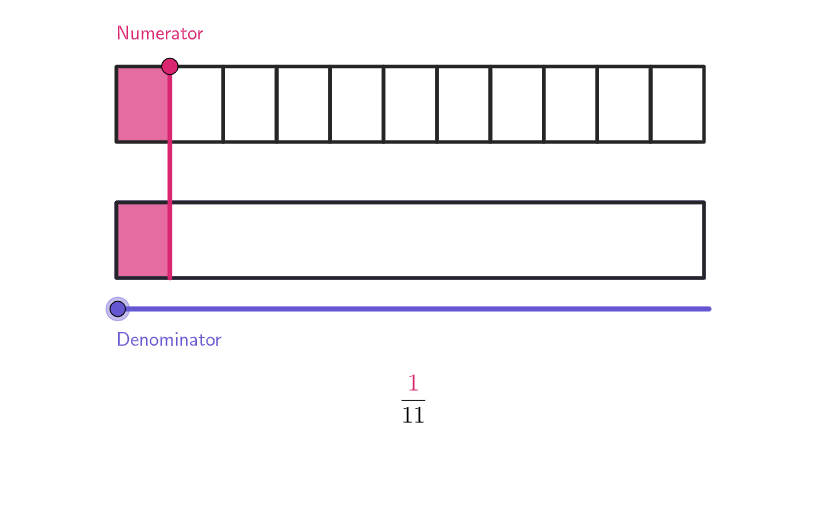
This example uses tape diagrams to demonstrate the concept of equivalent fractions, allowing students to create equivalent fractions with larger denominators. It utilizes various GeoGebra commands such as Vector, Polygon, and Translate. Suitable for students in grades 4-5 to learn how to write equivalent fractions with smaller or larger denominators. The example includes open-ended questions to deepen students' understanding of fractions.
GeoGebra Commands & Parameters
Shuffle({2, 3, 4, 5, 6, 7, 8, 9, 10, 11, 12, 13, 14, 15}) → bList, {11, 5, 4, 8, 7, 14, 3, 9, 13, 15, 6, 2, 10, 12}Element(bList, Mod[example, Length[bList]] + 1) → bKeepIf(Length[Intersection[PrimeFactors[ii], PrimeFactors[b]]] ≟ 0, ii, Sequence[b]) → relativePrimesVector((0, -1.8)) → heiPolygon(Zip[PixelsToPoint[Corner[1], Corner[3], Corner[5], A], A, {(pixelsLeft, pixelsTop), (pixelsLeft, y(Corner[5]) - pixelsBottom), Corner[5] - (pixelsRight, pixelsBottom), (x(Corner[5]) - pixelsRight, pixelsTop)}]) → borderBoxVertex(borderBox) → A, B, C, DTranslate(A', hei) → A''_{1}Translate(A''_{1}, Vector[wid / b]) → JVector(A''_{1}, J) → wid1partZip(Translate[(x(A'), 6.8), Vector[(wid1part * kk)]], kk, relativePrimes) → PositionsFakeSliderPoint(PositionsFakeSlider) → FakeSliderPointCorner(5) → AppSizeTranslate(A, wid) → A'_{1}Translate(A', wid) → A''Polygon(A, A', A'', A'_{1}) → q1, a_{1}, a', a'', a'_{1}Translate(A, hei) → A'_{2}Translate(A'', hei) → A'''Translate(A'_{1}, hei) → EPolygon(A'_{2}, A''_{1}, A''', E) → q1', a'_{2}, a''_{1}, a''', eTranslate(A''_{1}, Vector[(0.8 * hei)]) → FTranslate(F, hei) → GTranslate(G, wid) → HTranslate(E, Vector[(2 * hei)]) → E'Polygon(F, G, H, E') → q1'', f, g, h, e'IndexOf(FakeSliderPoint, PositionsFakeSlider) → aLength(relativePrimes) → maxATranslate(A', Vector[wid / b]) → IPolygon(A''_{1}, J, I, A') → q2, i, j, i_1, kSequence(Polygon[Translate[A''_{1}, Vector[(wid1part * ii)]], Translate[J, Vector[(wid1part * ii)]], Translate[I, Vector[(wid1part * ii)]], Translate[A', Vector[(wid1part * ii)]]], ii, 0, b - 1) → denMod1Sequence(Polygon[Translate[A''_{1}, Vector[(wid1part * ii)]], Translate[J, Vector[(wid1part * ii)]], Translate[I, Vector[(wid1part * ii)]], Translate[A', Vector[(wid1part * ii)]]], ii, 0, Element[relativePrimes, a] - 1) → numMod1Translate(G, Vector[(wid1part * Element[relativePrimes, a])]) → G'Translate(F, Vector[(wid1part * Element[relativePrimes, a])]) → F'Polygon({F, G, G', F'}) → GreenRectangleBelowTranslate(F, Vector[wid / n]) → F'_{1}Translate(G, Vector[wid / n]) → G'_{1}Sequence(Translate[Polygon[{F, G, G'_{1}, F'_{1}}], Vector[(wid / n * ii)]], ii, 0, n - 1) → DivisionsBelowSequence(Segment[Translate[A''_{1}, Vector[(wid1part * ii)]], Translate[F, Vector[(wid1part * ii)]]], ii, 0, b) → divisionsAboveSegment(FakeSlider1, FakeSlider2) → fakeSlider_{1}Polygon(A', A''_{1}, A''', A'') → q4, l, m, p, qPolygon({F, G, H, (x(H), y(F))}) → q5Segment(Element[PositionsFakeSlider, 1], Element[PositionsFakeSlider, Length[PositionsFakeSlider]]) → fakeSliderText(sliderALabel, FakeSliderPoint, true, true, 0, 1) → fakeSliderLabelSegment((x(A), y(A) - (3 / 5 * (y(A) - y(A')))), (x(A), y(A) - (3 / 5 * (y(A) - y(A')))) + wid) → fackeSliderDashTranslate(FakeSliderPoint, Vector[A', G]) → FakeSliderPoint'Segment(FakeSliderPoint, FakeSliderPoint') → verticalSegmentTranslate(hGL, Vector[(Vector[Corner[4], Corner[1]] / 500 * 16)]) → hGL'If(Length[denominators] ≟ 0, {}, Zip[(Element[relativePrimes, a] * kk / b), kk, denominators]) → numeratorsZip((((((("=\frac{" * nn) * "}{\textcolor{") * colorPurpleButton_{1}) * "}{") * dd) * "}}"), nn, numerators, dd, denominators) → l1
AI Drawing Prompt Reference
Draw tape diagrams to illustrate equivalent fractions with larger denominators. Start by creating a large rectangle to represent the whole, then divide it into multiple parts, highlighting different fractions with distinct colors. Include an interactive slider to adjust the number of parts, demonstrating the concept of equivalent fractions. The diagram should feature several rectangles, lines, and a slider, arranged clearly with noticeable color distinctions.
The prompt above was compiled from the original drawing commands and is for reference only.