
Equilateral Triangles and Rotations
Loading the math board and drawing, please wait…
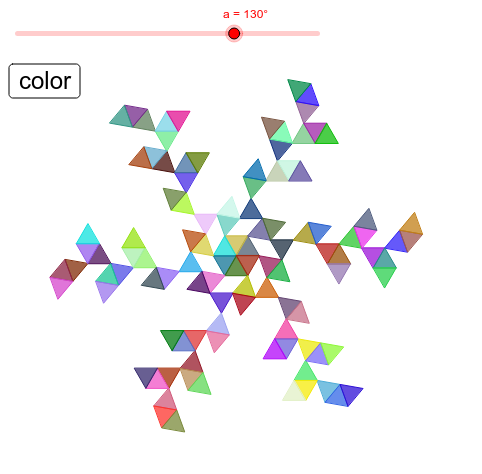
This example demonstrates the geometric transformation of equilateral triangles under rotation, involving core math concepts like rotation, properties of equilateral triangles, geometric transformations, probability & statistics, Pythagorean theorem, and circumcircle. It uses commands such as Rotate, Polygon, and Mirror in GeoGebra for construction, making it suitable for high school mathematics teaching or geometric transformation studies to understand the patterns and properties of rotational transformations.
GeoGebra Commands & Parameters
Rotate(B1, 60°, A1) → C1Rotate(C1, (-a), B1) → D1Rotate(C1, -60° - a, B1) → E1Polygon({A1, B1, C1}) → F1Polygon({B1, D1, E1}) → G1Rotate(B1, a, E1) → A2Rotate(B1, 60° + a, E1) → B2Rotate(B2, 60°, A2) → C2Rotate(C2, (-a), B2) → D2Rotate(C2, -60° - a, B2) → E2Polygon({A2, B2, C2}) → F2Polygon({B2, D2, E2}) → G2Rotate(B2, a, E2) → A3Rotate(B2, 60° + a, E2) → B3Rotate(B3, 60°, A3) → C3Rotate(C3, (-a), B3) → D3Rotate(C3, -60° - a, B3) → E3Polygon({A3, B3, C3}) → F3Polygon({B3, D3, E3}) → G3Rotate(F1, 60°) → J1Rotate(G1, 60°) → K1Rotate(F2, 60°) → J2Rotate(G2, 60°) → K2Rotate(F3, 60°) → J3Rotate(G3, 60°) → K3Rotate(F1, 120°) → L1Rotate(G1, 120°) → M1Rotate(F1, 180°) → N1Rotate(G1, 180°) → O1Rotate(F1, 240°) → P1Rotate(G1, 240°) → Q1Rotate(F1, 300°) → R1Rotate(G1, 300°) → S1Rotate(F2, 120°) → L2Rotate(G2, 120°) → M2Rotate(F2, 180°) → N2Rotate(G2, 180°) → O2Rotate(F2, 240°) → P2Rotate(G2, 240°) → Q2Rotate(F2, 300°) → R2Rotate(G2, 300°) → S2Rotate(F3, 120°) → L3Rotate(G3, 120°) → M3Rotate(F3, 180°) → N3Rotate(G3, 180°) → O3Rotate(F3, 240°) → P3Rotate(G3, 240°) → Q3Rotate(F3, 300°) → R3Rotate(G3, 300°) → S3Rotate(B3, a, E3) → A4Rotate(B3, 60° + a, E3) → B4Rotate(B4, 60°, A4) → C4Rotate(C4, (-a), B4) → D4Rotate(C4, -60° - a, B4) → E4Polygon({A4, B4, C4}) → F4Polygon({B4, D4, E4}) → G4Rotate(F4, 60°) → J4Rotate(G4, 60°) → K4Rotate(F4, 120°) → L4Rotate(G4, 120°) → M4Rotate(F4, 180°) → N4Rotate(G4, 180°) → O4Rotate(F4, 240°) → P4Rotate(G4, 240°) → Q4Rotate(F4, 300°) → R4Rotate(G4, 300°) → S4Mirror(G1, Line[E1, D1]) → H1Mirror(G2, Line[E2, D2]) → H2Mirror(G3, Line[E3, D3]) → H3Mirror(G4, Line[E4, D4]) → H4Mirror(F3, Line[A3, B3]) → I3Mirror(F4, Line[A4, B4]) → I4Rotate(H1, 60°) → T1Rotate(H1, 120°) → U1Rotate(H1, 180°) → V1Rotate(H1, 240°) → W1Rotate(H1, 300°) → X1Rotate(H2, 60°) → T2Rotate(H2, 120°) → U2Rotate(H2, 180°) → V2Rotate(H2, 240°) → W2Rotate(H2, 300°) → X2Rotate(H3, 60°) → T3Rotate(H3, 120°) → U3Rotate(H3, 180°) → V3Rotate(H3, 240°) → W3Rotate(H3, 300°) → X3Rotate(H4, 60°) → T4Rotate(H4, 120°) → U4Rotate(H4, 180°) → V4Rotate(H4, 240°) → W4Rotate(H4, 300°) → X4Rotate(I3, 60°) → Y3Rotate(I3, 120°) → Z3Rotate(I3, 180°) → AA3Rotate(I3, 240°) → AB3Rotate(I3, 300°) → AC3Rotate(I4, 60°) → Y4Rotate(I4, 120°) → Z4Rotate(I4, 180°) → AA4Rotate(I4, 240°) → AB4Rotate(I4, 300°) → AC4Rotate(I3, -60°, A3) → I13Rotate(I13, 60°) → J13Rotate(I13, 120°) → K13Rotate(I13, 180°) → L13Rotate(I13, 2400°) → M13Rotate(I13, 300°) → N13Rotate(I4, -60°, A4) → I14Rotate(I14, 60°) → J14Rotate(I14, 120°) → K14Rotate(I14, 180°) → L14Rotate(I14, 2400°) → M14Rotate(I14, 300°) → N14Rotate(H3, 60°, D3) → I15Rotate(H4, 60°, D4) → I16Rotate(I15, 60°) → J15Rotate(I15, 120°) → K15Rotate(I15, 180°) → L15Rotate(I15, 2400°) → M15Rotate(I15, 300°) → N15Rotate(I16, 60°) → J16Rotate(I16, 120°) → K16Rotate(I16, 180°) → L16Rotate(I16, 2400°) → M16Rotate(I16, 300°) → N16