
Equations and Graphs of Exponential Functions
Loading the math board and drawing, please wait…
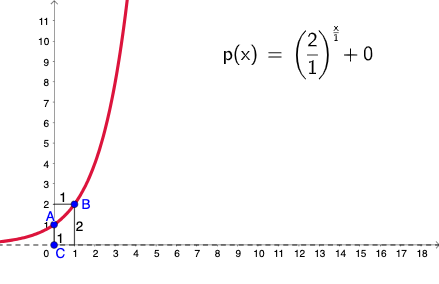
This example demonstrates the equations and graphs of exponential functions. It involves key mathematical concepts such as exponential functions, functions, rational numbers, logarithms, and coordinates. Using GeoGebra commands like Ray, Point, PointIn, and Segment, the graph of an exponential function can be constructed. Suitable for high school mathematics education and learning.
GeoGebra Commands & Parameters
Ray((0, 0), (0, 1)) → kPoint(k) → CPointIn(b) → APointIn(b) → BSegment(A, (x(A), y(C))) → gSegment(B, (x(B), y(C))) → hLaTeX(p, true, true) → text1Segment(B, (0, y(B))) → iSegment((0, y(A)), A) → j
AI Drawing Prompt Reference
On a Cartesian plane, draw a vertical ray starting at the origin and extending upward. Choose a reference point on this ray, then mark additional points positioned to correspond to the two sides of the construction. Connect each of the two points to the same vertical reference height by drawing two line segments that meet that shared level. Also include a segment from the y-axis (at the relevant y-coordinate) to one chosen point, so the diagram clearly shows how the points relate through a common height. Add a formatted mathematical text label near the indicated construction location to support the exponential-function equation and graph setup.
The prompt above was compiled from the original drawing commands and is for reference only.