
Equation of a Straight Line Given Two Points in the Coordinate Plane
Loading the math board and drawing, please wait…
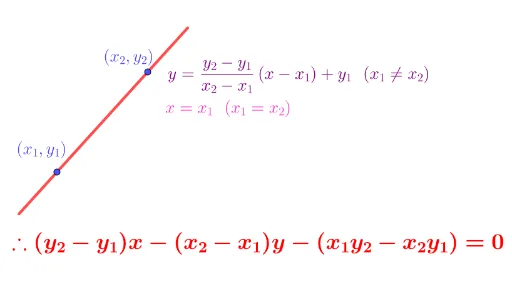
① This example demonstrates how to find the equation of a straight line when the coordinates of two points are given in the coordinate plane, with GeoGebra automatically generating the line and displaying its equation. ② The core mathematical concepts involve coordinate geometry, specifically the two-point form of a line, slope, and intercepts. ③ Construction details: from the summary, the Line command creates line f, Point defines points A and B, Segment constructs segments, and multiple text objects (e.g., 텍스트1_1) display the equation; additional points, lines, and a button (버튼1) are included for interactive or step-by-step exploration. ④ Suitable for middle or high school mathematics lessons on analytic geometry, and for students to explore the principle that two points determine a line, enhancing understanding of coordinates and linear equations.
GeoGebra Commands & Parameters
Line(A, B) → fPoint(f) → CPoint(f) → DSegment(C, D) → g
AI Drawing Prompt Reference
Draw a coordinate plane with two points marked, and construct a straight line passing through both points, with its equation displayed on the graph. Then place two additional points on the line and connect them with a segment to highlight a portion of the line. Include coordinate axes, grid, point labels, and the line equation text, illustrating how two points determine a line.
The prompt above was compiled from the original drawing commands and is for reference only.