
Equation and Graph of a Circle
Loading the math board and drawing, please wait…
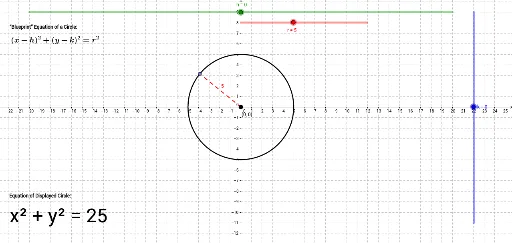
This applet uses three sliders to control the circle's center coordinates h, k, and radius r, helping students understand the relationship between the circle's equation and its geometric properties. Key mathematical concepts include the equation of a circle and coordinate geometry. It utilizes commands like TurningPoint, Point, Center, and Segment. Suitable for middle school and above students to learn about circles.
GeoGebra Commands & Parameters
TurningPoint(g) → APoint(p) → CCenter(f) → YPoint(f) → BSegment(Y, B) → a
AI Drawing Prompt Reference
Draw a circle controlled by three sliders for the center coordinates and radius, showing the relationship between the circle's equation and its geometric properties. Start by plotting a point as the center, then use sliders to determine its position, draw a line segment from the center to a point on the circle as the radius, and finally complete the circle.
The prompt above was compiled from the original drawing commands and is for reference only.