
Epicycles Tracing a Square Closed Curve
Loading the math board and drawing, please wait…
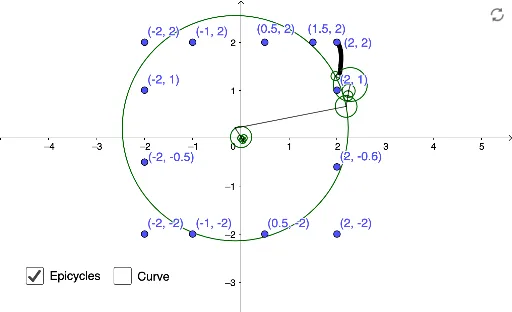
This example demonstrates the dynamic construction of a square closed curve using epicycles. It involves core mathematical concepts such as rotation, parametric equations, coordinate geometry, and the construction of regular polygons. Key GeoGebra commands and objects used in the construction include Sequence, Sum, CurveCartesian, Join, PolyLine, Last, button1, dt, and path. It is suitable for high school and above students to understand the application of parametric equations in plane geometry and the methods of constructing dynamic geometry models.
GeoGebra Commands & Parameters
Sequence(j, j, ((-(N - 1))) / 2, (N - 1) / 2) → FreqSequence((1 / N * Sum[Sequence[(x(Element[L_1, j]) * cos(((((2 * π)) / N * k) * (j - 1)))) + (y(Element[L_1, j]) * sin(((((2 * π)) / N * k) * (j - 1)))), j, 1, N]]), k, ((-(N - 1))) / 2, (N - 1) / 2) → FRealSequence((1 / N * Sum[Sequence[(y(Element[L_1, j]) * cos(((((2 * π)) / N * k) * (j - 1)))) - (x(Element[L_1, j]) * sin(((((2 * π)) / N * k) * (j - 1)))), j, 1, N]]), k, ((-(N - 1))) / 2, (N - 1) / 2) → FImgSequence(sqrt(Element[FReal, j]^(2) + Element[FImg, j]^(2)), j, 1, N) → ModSequence(atan2(Element[FImg, j], Element[FReal, j]), j, 1, N) → PhaSum(Sequence[(cos((Element[Freq, j] * x)) * Element[FReal, j]) - (sin((Element[Freq, j] * x)) * Element[FImg, j]), j, 1, m]) → fxSum(Sequence[(cos((Element[Freq, j] * x)) * Element[FImg, j]) + (sin((Element[Freq, j] * x)) * Element[FReal, j]), j, 1, m]) → fyCurveCartesian(fx(t), fy(t), t, 0, (2 * π)) → pathJoin({{C1}, Sequence[Sum[Sequence[((Element[Mod, j] * cos(Element[Pha, j] + (Element[Freq, j] * t0))), (Element[Mod, j] * sin(Element[Pha, j] + (Element[Freq, j] * t0)))), j, 1, k]], k, 1, m]}) → L_2PolyLine(L_2) → sJoin({{Circle[(0, 0), Element[L_2, 2]]}, Sequence[Circle[Element[L_2, i], Element[Mod, i]], i, 1, m]}) → L_3Last(L_2) → SqrPoint
AI Drawing Prompt Reference
Draw a square closed curve using a series of circles and points on their circumferences to approximate the square's shape. First, create a series of circles with different frequencies, and each point on these circles moves according to specific parametric equations to form the square's outline. Finally, connect these points to form a smooth curve.
The prompt above was compiled from the original drawing commands and is for reference only.