
Epicicloides: Geometric Construction via Differential Equations
Loading the math board and drawing, please wait…
In collections
geometriadinamica.es
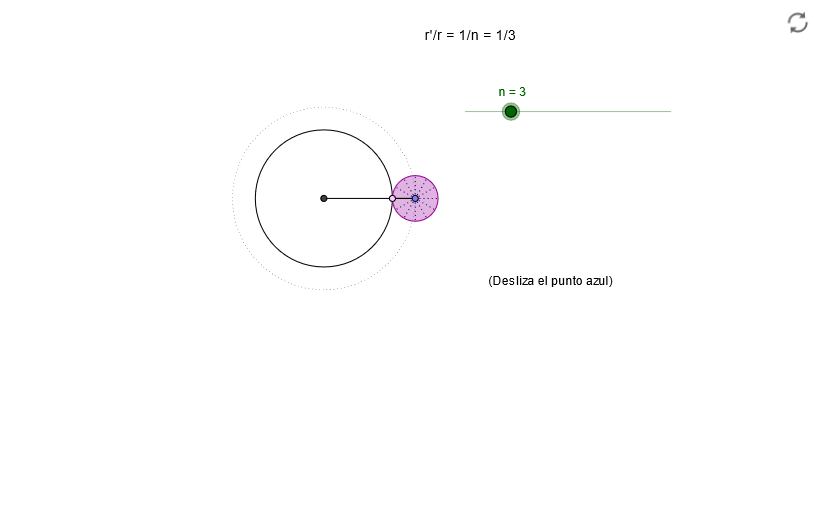
This example demonstrates the construction of geometric figures using differential equations and vector analysis. Key mathematical concepts include triangle properties, solving differential equations, and vector rotation and transformation. Construction involves using GeoGebra commands like Intersect, Circle, Point, Ray, Angle, and Rotate. Suitable for high school students or undergraduate students learning the integration of geometry and calculus.
GeoGebra Commands & Parameters
Intersect(xAxis, yAxis) → OCircle(O, 1 + m / n) → dPoint(d) → ARay(O, A) → bAngle(B, O, A) → αCircle(O, B) → cIntersect(c, b) → D,Circle(A, m / n) → eRotate(D, (n * α / m), A) → CSegment(A, C) → aCircleArc(A, D, C) → fCircleArc(O, B, D) → gSegment(O, A) → hRotate(A, 29.999999999999996°, A) → A'Rotate(C, 29.999999999999996°, A) → C'Segment(A', C') → iRotate(A', 29.999999999999996°, A) → A''Rotate(C', 29.999999999999996°, A) → C''Segment(A'', C'') → jRotate(A'', 29.999999999999996°, A) → A'''Rotate(C'', 29.999999999999996°, A) → C'''Segment(A''', C''') → kRotate(A''', 29.999999999999996°, A) → A''''Rotate(C''', 29.999999999999996°, A) → C''''Segment(A'''', C'''') → lRotate(A'''', 29.999999999999996°, A) → A'''''Rotate(C'''', 29.999999999999996°, A) → C'''''Segment(A''''', C''''') → m_1Rotate(A''''', 29.999999999999996°, A) → A''''''Rotate(C''''', 29.999999999999996°, A) → C''''''Segment(A'''''', C'''''') → n_1Rotate(A'''''', 29.999999999999996°, A) → A'''''''Rotate(C'''''', 29.999999999999996°, A) → C'''''''Segment(A''''''', C''''''') → pRotate(A''''''', 29.999999999999996°, A) → A''''''''Rotate(C''''''', 29.999999999999996°, A) → C''''''''Segment(A'''''''', C'''''''') → qRotate(A'''''''', 29.999999999999996°, A) → A'''''''''Rotate(C'''''''', 29.999999999999996°, A) → C'''''''''Segment(A''''''''', C''''''''') → sRotate(A''''''''', 29.999999999999996°, A) → A''''''''''Rotate(C''''''''', 29.999999999999996°, A) → C''''''''''Segment(A'''''''''', C'''''''''') → tRotate(A'''''''''', 29.999999999999996°, A) → A'''''''''''Rotate(C'''''''''', 29.999999999999996°, A) → C'''''''''''Segment(A''''''''''', C''''''''''') → a_1Rotate(D, (n * α / m), A) → E
AI Drawing Prompt Reference
Draw an epicycloid geometric construction. Start with coordinate axes and origin. Draw a large circle centered at the origin with radius equal to one plus a ratio parameter. Take a point on this large circle as the center of a rolling circle, then draw a small circle with radius equal to the ratio parameter. Draw a ray from the origin through the point on the large circle, and find its intersection with the small circle. Rotate this intersection point around the rolling circle's center by a specific angle to obtain a new point, then connect the rolling circle's center with this new point. Repeat the rotation and connection process multiple times to create a series of line segments from the rolling circle's center. The endpoints of these segments trace out the epicycloid curve. Also display corresponding arcs on the large circle. The overall construction demonstrates the trajectory formed by a point on a circle rolling outside another fixed circle.
The prompt above was compiled from the original drawing commands and is for reference only.