
Elliptic Cone: Parametric Surface and Geometric Construction
Loading the math board and drawing, please wait…
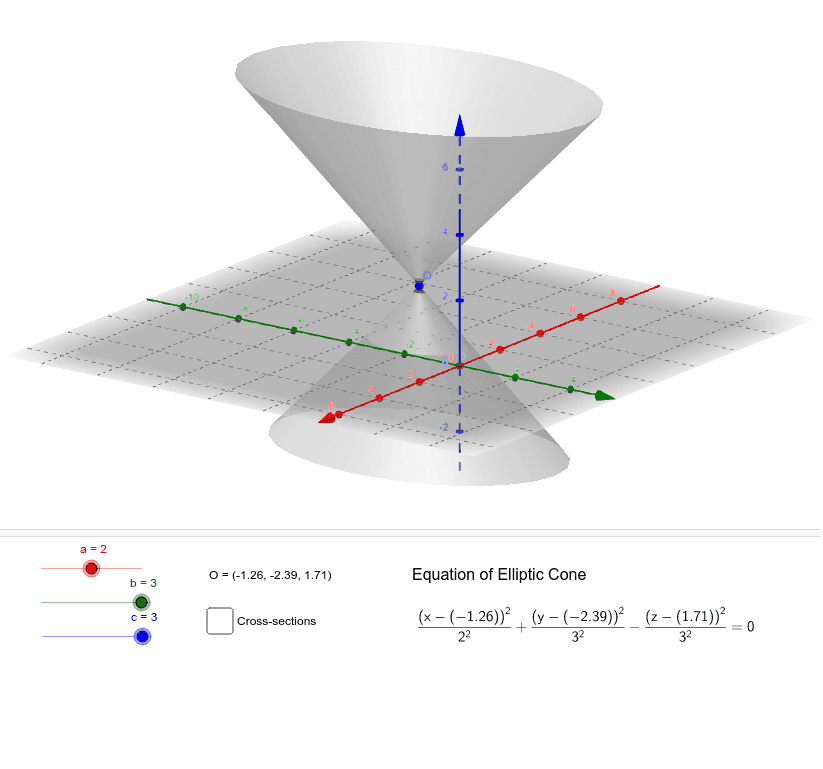
①This example demonstrates the generation of an elliptic cone as a 3D surface, using parametric equations to visualize its spatial form. ②Core mathematical concepts include the standard equation of an elliptic cone, parametric surface representation, 3D coordinate system geometry, and relationships between the cone, coordinate axes, and cross-sections. ③Construction highlights: Based on the construction summary, the GeoGebra commands Surface and CurveCartesian are used, with parameters a, b, c controlling the cone's dimensions. The origin O and coordinate axes ox, oy, oz are created, along with text objects text1, text2, text3 for labeling, and auxiliary objects k, d, f, h, j, l, e, i for adjustments or display. ④This is suitable for high school solid geometry, college analytic geometry, or calculus courses to learn parametric surfaces and 3D graphing, and for mathematical visualization demonstrations.
GeoGebra Commands & Parameters
Surface(((a * w) * cos(v)) + ox, ((b * w) * sin(v)) + oy, (c * w) + oz, v, 0, 6.28319, w, -3, 3) → dCurveCartesian((a * cos(t)) + ox, (b * sin(t)) + oy, oz - c, t, 0, 6.28319) → fCurveCartesian((a * cos(t)) + ox, (b * sin(t)) + oy, oz + c, t, 0, 6.28319) → hCurveCartesian((a * w) + ox, oy, (c * w) + oz, w, -3, 3) → jCurveCartesian((a * w) + ox, oy, ((-c) * w) + oz, w, -3, 3) → lCurveCartesian(ox, (b * w) + oy, (c * w) + oz, w, -3, 3) → eCurveCartesian(ox, (b * w) + oy, ((-c) * w) + oz, w, -3, 3) → i
AI Drawing Prompt Reference
Draw an elliptic cone using parametric equations to visualize its 3D surface. Include coordinate axes and the origin. Show auxiliary lines to illustrate the relationship between the elliptical cross-sections and the cone. Start with the surface, then draw the top and bottom elliptical cross-sections and the side elliptical curves, finally add coordinate axes and origin labels.
The prompt above was compiled from the original drawing commands and is for reference only.