
Ellipse Focus-Directrix-Eccentricity Interactive Demo
Loading the math board and drawing, please wait…
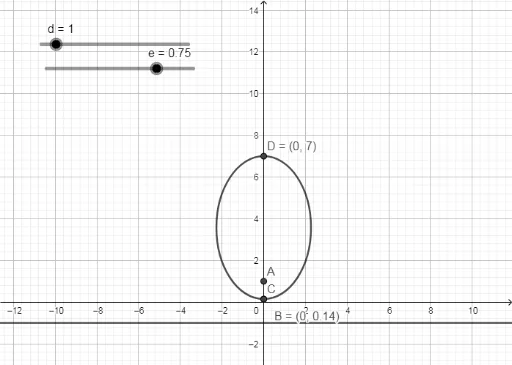
①This GeoGebra example dynamically demonstrates how an ellipse is defined by its focus, directrix, and eccentricity, showing that for any point on the ellipse, the ratio of its distance to the focus and its distance to the directrix equals the eccentricity e. ②Core mathematical concepts include the focus-directrix definition of an ellipse, eccentricity (0<e<1), the unified definition of conic sections, and basic geometric elements such as points, lines, and intersections. ③Construction highlights: from the summary, the Intersect command is used to find intersection points, involving objects like the directrix d, focus f, point A, ellipse e, point c, and points B, C, D; by adjusting these elements or parameters, one can observe how the ellipse shape changes with eccentricity. ④Suitable for high school analytic geometry or college conic sections courses, this tool helps students understand the definition and geometric properties of an ellipse, and serves as an interactive demonstration for teachers or self-exploration for learners.
GeoGebra Commands & Parameters
Intersect(c, yAxis, 1) → BIntersect(c, yAxis) → C, D
AI Drawing Prompt Reference
Draw an ellipse illustrating the relationship between its focus, directrix, and eccentricity. Start with a vertical directrix line and a focus point to its right, with an adjustable eccentricity slider between 0 and 1. Construct the locus of points where the ratio of distance to the focus over distance to the directrix equals the eccentricity, forming the ellipse. The ellipse intersects the vertical axis at two points; take one intersection and connect it to the focus and directrix to show the geometric relation. Adjust the eccentricity to see the ellipse change from nearly circular to elongated.
The prompt above was compiled from the original drawing commands and is for reference only.